 Radbin
The short answer: connect ChatGPT or Claude to Photoshop with an MCP connector such as Radbin, open a new document at your page's size (1440 pixels wide is a common desktop width), and describe the site: who it's for, its sections and its style. The AI builds the page with Photoshop's own tools, in text layers, shapes and groups, and makes pictures with an AI model where the page needs them. You get a layered design to refine and hand over, not a live website.
Full disclosure: I make Radbin, the connector that let ChatGPT work in Photoshop here. I made this page on 25 November 2026 with ChatGPT Plus. It took about 4 minutes.
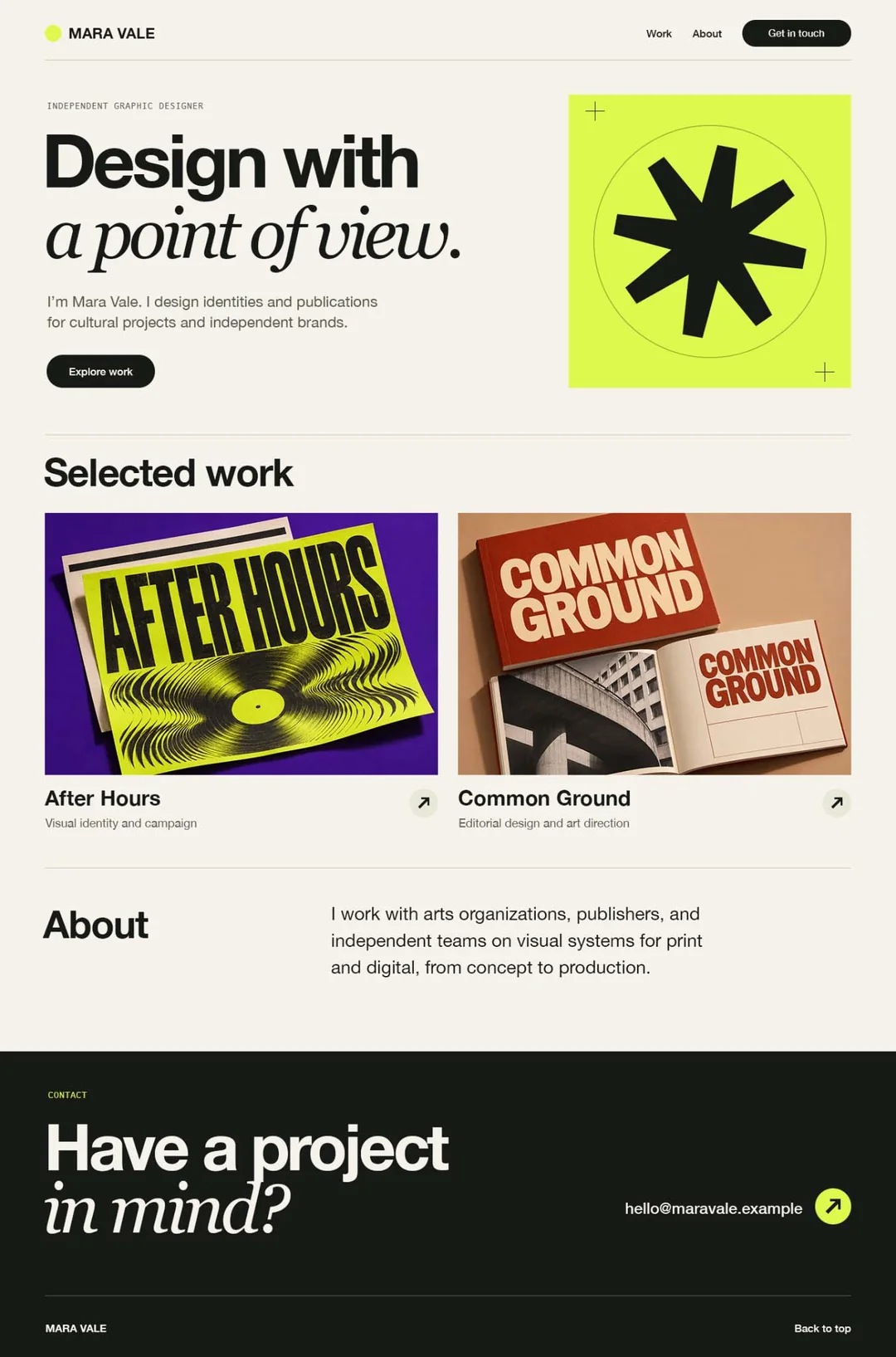
What ChatGPT built
A one-page portfolio for a made-up designer, Mara Vale: 1440 × 2180 pixels at 72 ppi in sRGB, the usual setup for a screen. Top to bottom:
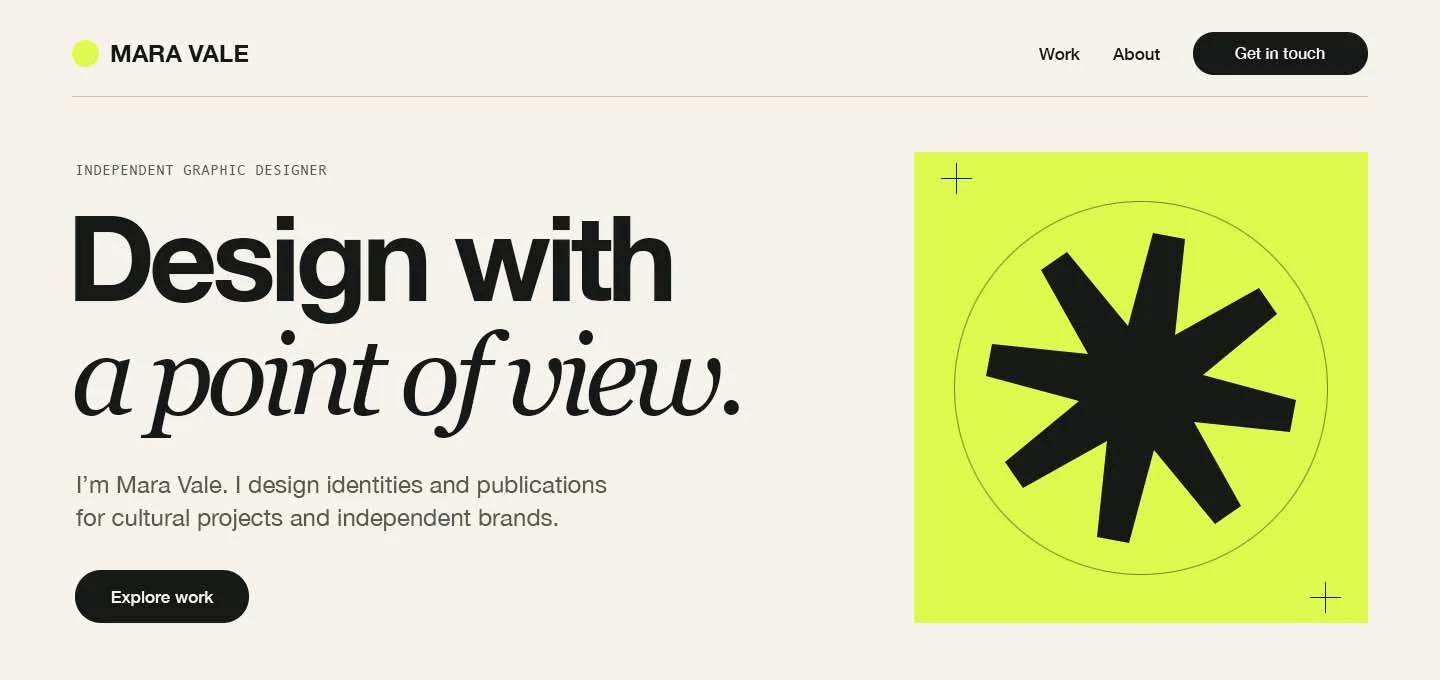
- Header: a wordmark with a lime dot, Work and About links, and a dark “Get in touch” pill.
- Hero: a bold sans headline, “Design with”, over an italic serif line, “a point of view.”, a two-line bio, an “Explore work” button and a lime graphic mark built from shapes.
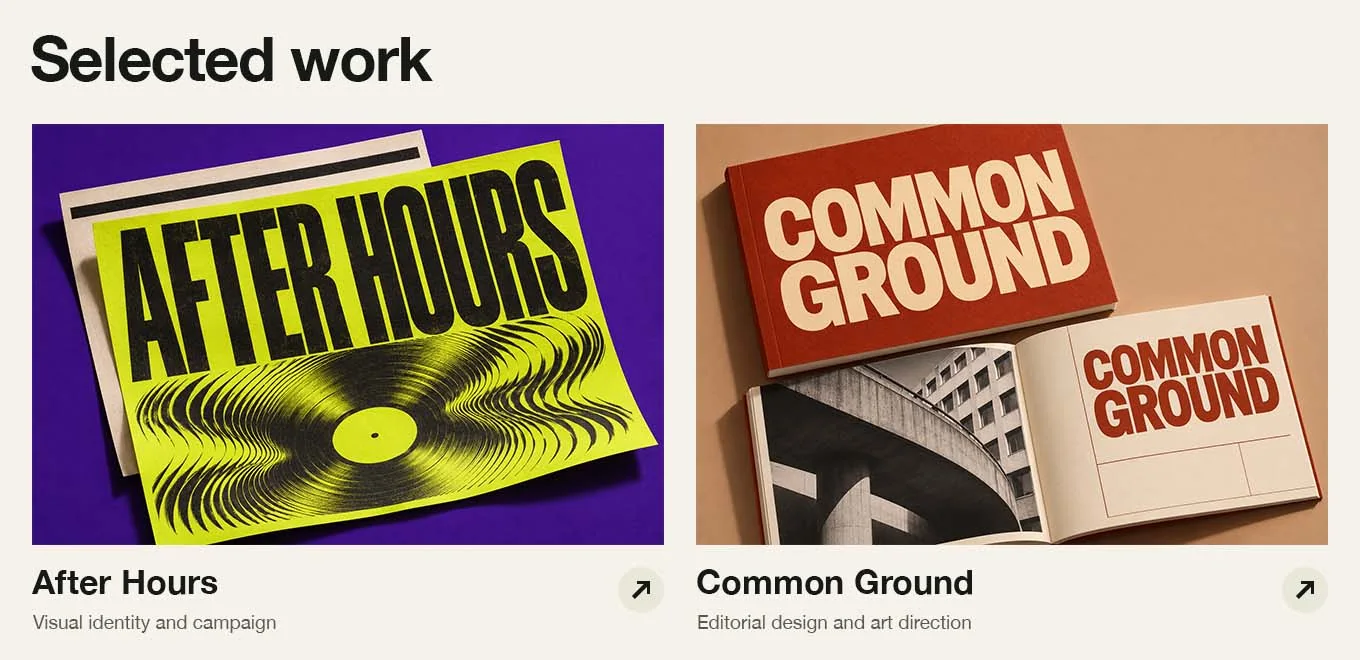
- Selected work: two project cards, each with a picture, a title, a discipline and a round open button.
- About: a heading and a short paragraph, in two columns.
- Footer: a dark field with “Have a project in mind?”, an email address and a lime button.
The whole prompt, as I typed it (typo and all):
I want you to open a new document and do a web design for for a website for a graphic designer as a portfolio.
One sentence. ChatGPT chose the made-up designer, the sections, the fonts, the lime accent and the layout itself.
Every part is a layer you can edit
This is the difference from an AI image generator, which hands you one flat picture. ChatGPT worked through Radbin's tools, so the page is a real Photoshop file: 50 layers, grouped by section, each with a name that says what it is. The headlines and the text are live type you can retype, the buttons and lines are shape layers, and the two project pictures are smart objects you can swap for real work.
- Footer · project inquiries
- Contact · headline
- Contact · email button
- About · designer profile
- About copy
- Work · selected projects
- Common Ground · editorial artwork
- After Hours · campaign artwork
- Selected work
- Hero · introduction
- Hero · graphic mark
- Explore work · button
- Hero · italic headline
- Hero · headline
- Header · navigation
- Wordmark
- Wordmark · lime dot
- Page · warm paper
Some of the page's real layers, as Photoshop lists them, top to bottom.
Up close, at 100%, the type is crisp and the spacing is even:
Why design a website in Photoshop at all?
To be fair, most interface design now happens in Figma, which builds responsive layouts and clickable prototypes. A Photoshop page is still a quick way to show a client a look when the page is mostly pictures, when you're a photographer or retoucher who lives in Photoshop, or when a client asks for a PSD. With AI doing the layout, the first version takes minutes, and you keep control of every pixel.
How to design your own
1. Connect your AI app. Install Radbin, start free, and connect ChatGPT (on a paid plan) or Claude (its free plan works).
2. Brief it. Say who the site is for, the sections, the style, and that everything stays editable. A prompt to start from:
Design a homepage for [a wedding photographer's portfolio] in Photoshop, 1440 pixels wide: a header with the name and three links, a hero with a big headline and one button, [three] project cards, an about section and a dark footer with an email. Style: [warm, minimal, editorial], two fonts I have installed, one accent colour. Put every element on its own named layer, grouped by section, with all text as live type.
3. Check it at 100%. Look at the type, the spacing and the edges, then ask for changes the way you'd tell a designer: Make the hero headline smaller and give the cards more room.
4. Put in the real content. Replace the AI pictures with real work and the copy with real words. For a client's logo, place the real file: Radbin never draws or generates a brand's logo.
5. Hand it over. Ask for a PNG of the page for the client, and give the PSD to whoever builds the site: the sizes, colours and fonts are all in the layers.
Other pages to try
- A landing page for [a yoga studio's spring offer]: a hero photo, three benefits, prices and a signup button.
- A phone version of this page, 390 pixels wide, with the same sections stacked.
- An email newsletter header, 600 pixels wide, in the same style.
More real jobs, done by AI in Photoshop
- AI in Photoshop: every way to use it
- Poster and flyer design in Photoshop with AI
- YouTube thumbnails in Photoshop with AI
- Virtual staging in Photoshop with AI
- Business card design in Photoshop with AI
- Brochure design in Photoshop with AI
- Catalog design in Photoshop with AI
- Mobile app design in Photoshop with AI
- Label design in Photoshop with AI
- Photoshop automation: actions, batch and AI agents
- Claude in Photoshop prompts that worked
- How to connect Claude to Photoshop, or ChatGPT
Connect your AI app to Photoshop, free
Radbin gives Claude, ChatGPT and other AI apps Photoshop's own tools and a playbook of how a professional edits. Connecting is free, and a free account adds 40 credits for Radbin's AI models.
Watch Radbin on YouTube
Real tests and tutorials, inside Photoshop and Premiere. See the whole channel.
 21:44Photoshop 2027 new features vs Radbin
 19:57Claude Opus 5.5 edits my video in Premiere Pro
 16:20GPT Image 2.6 in Photoshop: images, vectors and GIFs
 7:37Upscale a low res portrait to 4K in Photoshop
 19:25Relight any photo in Photoshop with AI
 20:03Nano Banana 2.1 vs GPT Image 2 and FLUX 3: ten tests
 14:31Photoshop Relight vs Radbin Lightsmith
 10:24Retouch skin without losing the texture
 9:28Every Radbin tool in 9 minutes
 9:50Fix the focus of any photo after it was taken
 1:43Radbin changes only what you ask