 Radbin
The short answer: connect Claude or ChatGPT to Photoshop with an MCP connector such as Radbin and describe the catalog: the brand, the products, the page size and the style. The AI makes the pages at print size, makes product cut-outs and room photos with AI models that match each other, and sets the type on named layers you can change.
Full disclosure: I make Radbin. Claude (Opus 5.5) made this catalog through Radbin in my Photoshop on 25 November 2026. Every photo in it is made by AI, with two of Radbin's models, for 19 credits. The brand, the products and the prices are made up.
What Claude made
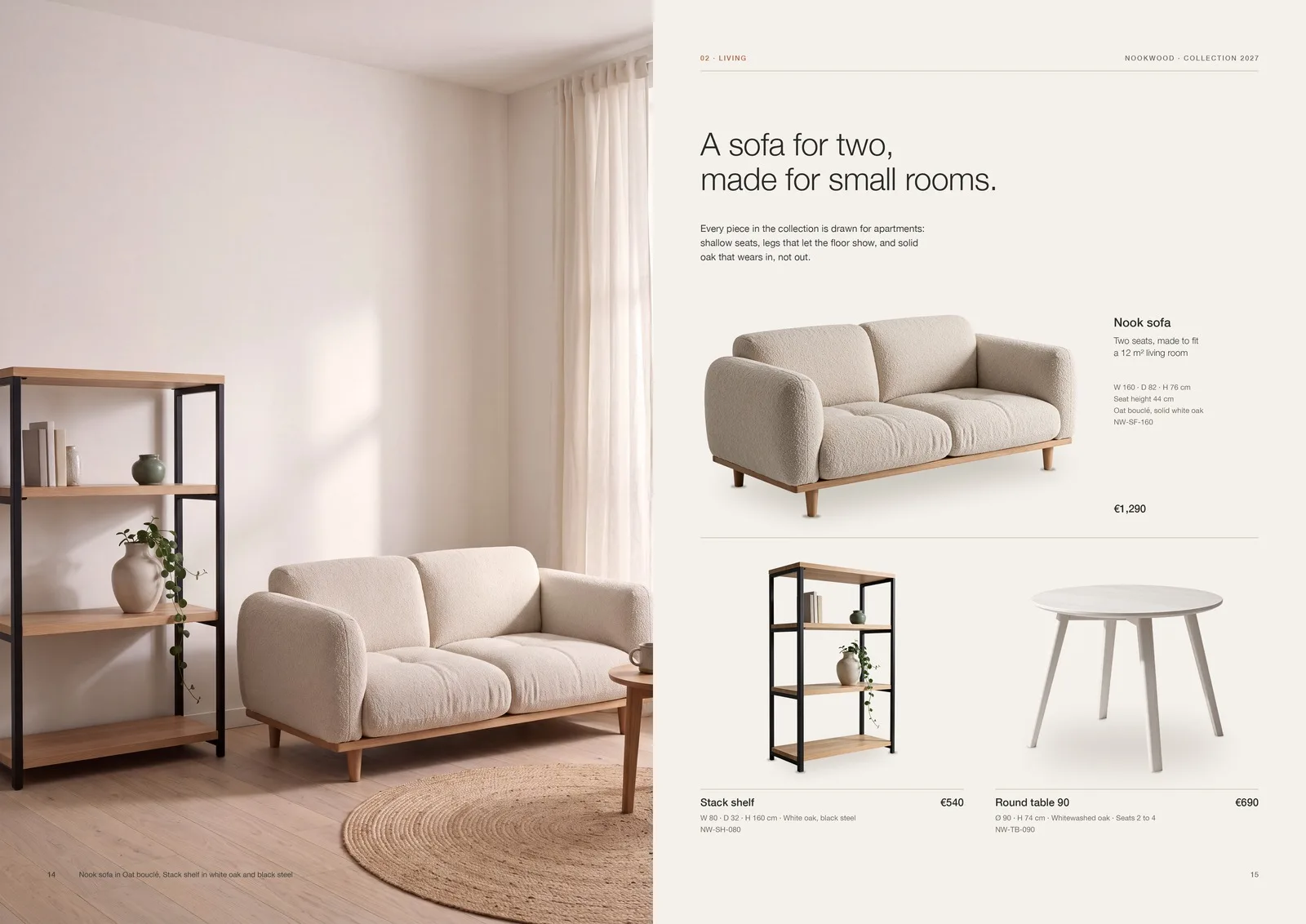
Before designing, Claude looked at how furniture brands lay out their catalogs: big photos of rooms beside small cut-outs of each piece with only its name, sizes and price, an asymmetric grid, thin lines and plenty of white space. Then it made up Nookwood, a maker of furniture for small apartments, and designed:
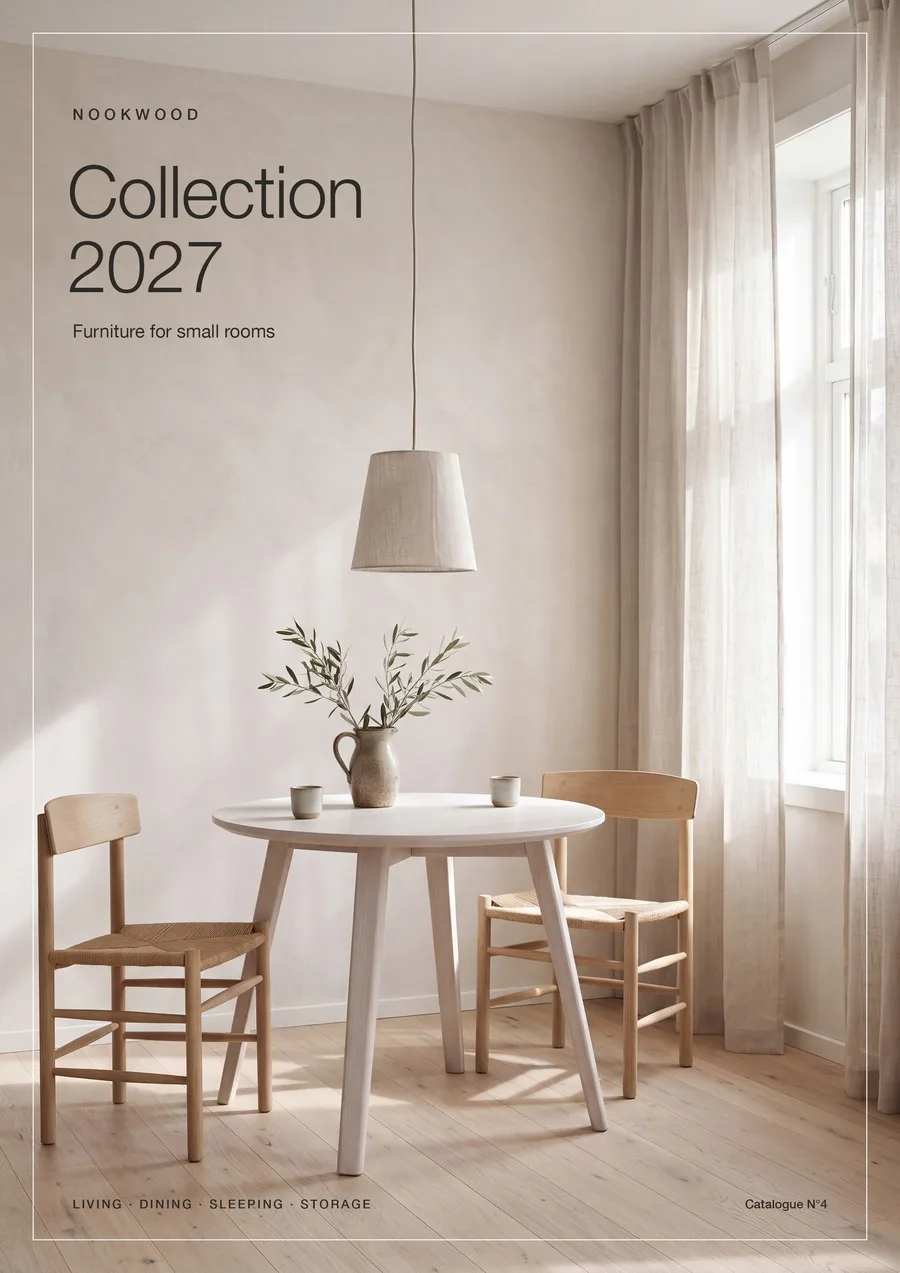
- The cover: a dining corner by a window, “Collection 2027” in Helvetica Neue Light on the empty wall, a thin white frame, and the rooms the catalog covers.
- Page 14: a living room with the sofa and the shelf, full bleed, with a caption.
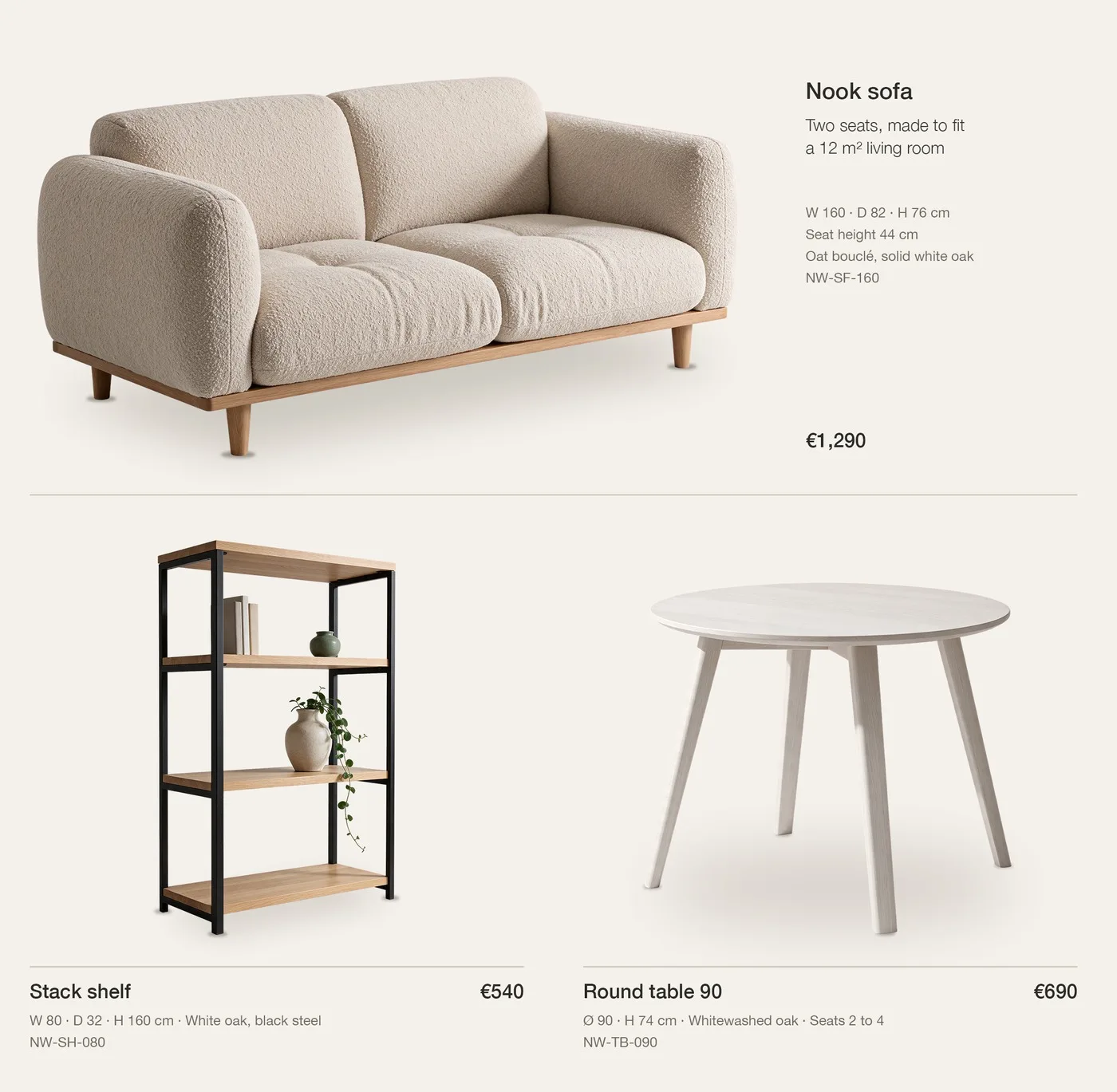
- Page 15: a headline, a short intro and three products on warm paper: the Nook sofa large, and the Stack shelf and the Round table 90 below, each with its sizes, finish, code and price.
Photos that match
A catalog falls apart when the sofa in the room isn't the sofa in the product shot. So Claude made the products first and the rooms second:
- Three cut-outs with Seedream 5.5 on a transparent background, all lit from the upper left: the sofa, the shelf and the table. 3 credits each, made side by side in about 30 seconds.
- The living room with Nano Banana 2.1 at 4K, with the sofa and the shelf as references, so the same pieces stand in the room, down to the vases on the shelf. 5 credits.
- The cover the same way, with the table as its reference. 5 credits.
- A colour check: Claude measured the sofa in the room against its cut-out. In the room it was lighter and a little cooler, about 4 ΔE apart, so Claude warmed the room photo with a Photo Filter layer until the fabric read as the same oat.
The layout
- Size: A4 pages at 300 ppi; the spread is 4960 × 3508 pixels.
- Grid: 15 mm margins, the sofa across the top with its details in a narrow column beside it, two products below, and hairlines between.
- Type: Helvetica Neue in three weights: Light for the headline, Regular for the text, Medium for names and prices.
- Colour: warm paper, warm black, and one terracotta accent for the section name.
- Shadows: a soft shade under each piece and a small contact shadow under each foot, so nothing floats.
What it took
| Part | Model | AI credits |
|---|---|---|
| Sofa, shelf and table cut-outs | Seedream 5.5 | 9 |
| Living room photo, 4K | Nano Banana 2.1 | 5 |
| Cover photo, 4K | Nano Banana 2.1 | 5 |
| Layout, type and shadows | Photoshop's own tools | None |
About 11 minutes for the cover and the spread, with a short pause while I looked at another document.
What it had to fix
- The table came out whitewashed, not natural oak. Claude kept it and called the finish whitewashed oak in the specs, rather than paying for another try.
- The cut-outs sat too high. Each came with faint, invisible pixels below it, so lining them up by their edges left them floating. Claude stood each one on the floor line by its visible feet.
- The cover's window was where the title goes. Claude flipped the photo so the empty wall took the title.
Make yours
Connect Claude or ChatGPT to Photoshop with Radbin, then ask:
Design an A4 catalog for [my furniture brand]: a cover and one spread at 300 ppi. Make the products first as cut-outs on a transparent background with the same light, then the room photos with those cut-outs as references, so they match. The spread: a full-bleed room photo on the left; on the right a headline and [three] products, each with its name, sizes, finish and price. [Calm and Scandinavian], one sans-serif family, warm paper. Tell me the price before you start.
Selling real products? Open your own product photos instead: Claude cuts them out and lays them in, and the AI makes only the rooms around them. For a smaller job with shapes and type only, see brochure design in Photoshop with AI.
More real jobs, done by AI in Photoshop
- AI in Photoshop: every way to use it
- Web design in Photoshop with AI
- Poster and flyer design in Photoshop with AI
- YouTube thumbnails in Photoshop with AI
- Virtual staging in Photoshop with AI
- Business card design in Photoshop with AI
- Brochure design in Photoshop with AI
- Mobile app design in Photoshop with AI
- Label design in Photoshop with AI
- Photoshop automation: actions, batch and AI agents
- Claude in Photoshop prompts that worked
- How to connect Claude to Photoshop, or ChatGPT
Connect your AI app to Photoshop, free
Radbin gives Claude, ChatGPT and other AI apps Photoshop's own tools and a playbook of how a professional edits. Connecting is free, and a free account adds 40 credits for Radbin's AI models.
Watch Radbin on YouTube
Real tests and tutorials, inside Photoshop and Premiere. See the whole channel.
 21:44Photoshop 2027 new features vs Radbin
 19:57Claude Opus 5.5 edits my video in Premiere Pro
 16:20GPT Image 2.6 in Photoshop: images, vectors and GIFs
 7:37Upscale a low res portrait to 4K in Photoshop
 19:25Relight any photo in Photoshop with AI
 20:03Nano Banana 2.1 vs GPT Image 2 and FLUX 3: ten tests
 14:31Photoshop Relight vs Radbin Lightsmith
 10:24Retouch skin without losing the texture
 9:28Every Radbin tool in 9 minutes
 9:50Fix the focus of any photo after it was taken
 1:43Radbin changes only what you ask