 Radbin
The short answer: connect Claude or ChatGPT to Photoshop with an MCP connector such as Radbin and describe the app: what it does, which screens, and the style. The AI builds each screen from rounded rectangles, circles and live type in the phone's own font, on named layers grouped by screen. It's a design to show and refine, not a working app, and with shapes and type only it costs no credits.
Full disclosure: I make Radbin. Claude (Opus 5.5) made this design through Radbin in my Photoshop on 25 November 2026, with Photoshop's own tools only, so it used no AI credits.
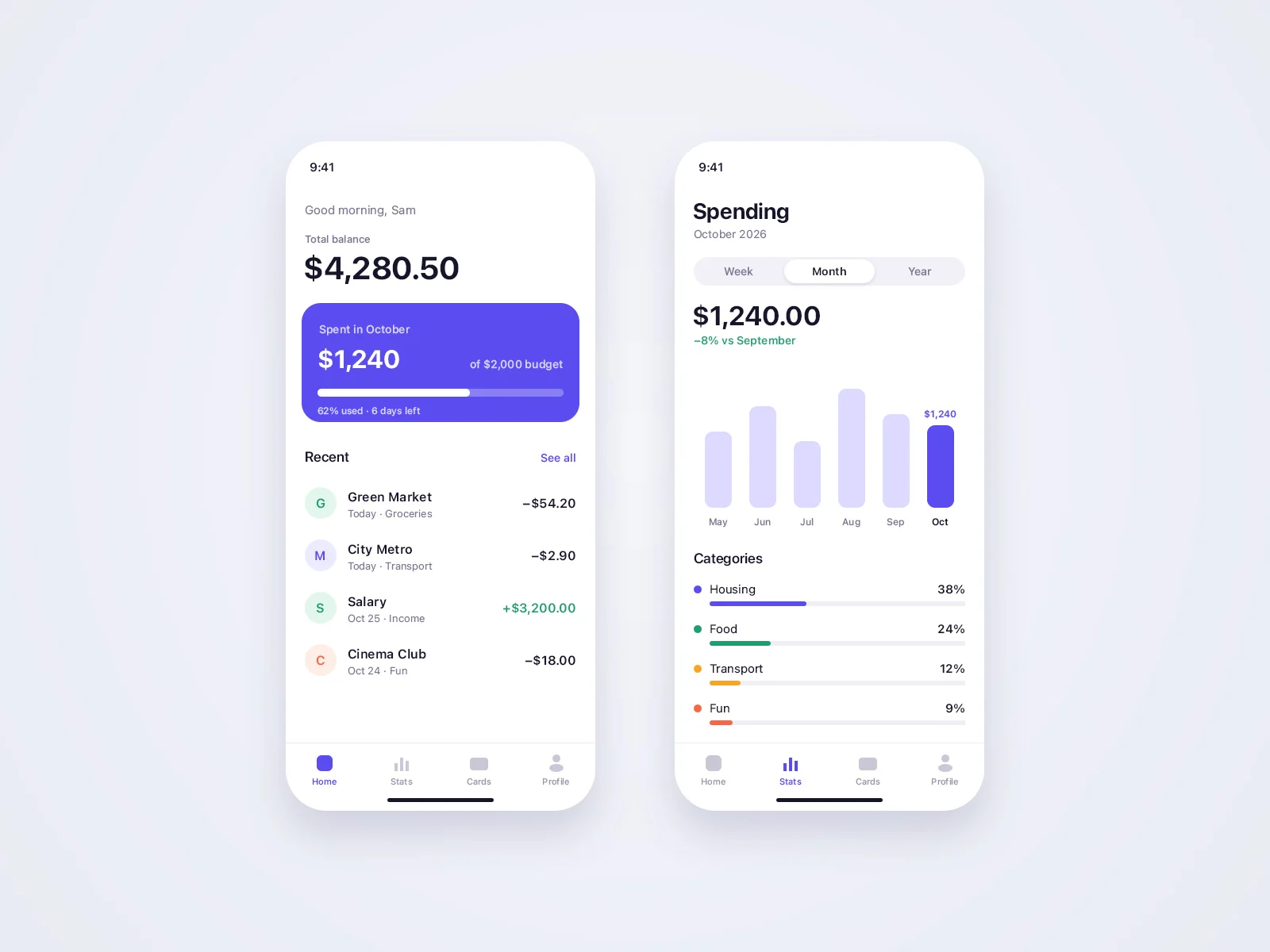
What Claude built
- Home: a greeting, the total balance, a violet card with the month's spending and a progress bar, four recent transactions with coloured initials, and a tab bar.
- Stats: a Week, Month and Year switch, the month's total against last month, a six-month bar chart with this month highlighted, and four spending categories with their shares.
How it's built
- Screens of 390 × 844, the size in points of most recent iPhones, with round corners from a true rounded-rectangle selection.
- SF Pro, the iPhone's own font, as live type, in four sizes.
- Shapes for everything else: cards, bars, progress, dots and the tab bar's icons, each a colour fill layer you can recolour.
- One group per screen, each layer named for what it is, such as “Row 3 · amount” or “Chart · October”.
What it took
| Time | AI credits | Layers |
|---|---|---|
| 3 minutes 33 seconds, both screens | None | About 100 |
Photoshop or Figma?
To be fair: for a real product, Figma is the better tool, with components, auto layout, prototypes and hand-off to developers. A Photoshop design is good for a concept, a pitch, a portfolio piece or an app store screenshot, and an AI agent gets you a first version in minutes.
Make yours
Connect Claude or ChatGPT to Photoshop with Radbin, then ask:
Design two screens of a mobile app for [booking a table at my restaurant], 390 × 844 each, side by side on a soft background: [the home screen with today's free tables] and [the booking screen]. Use SF Pro, one accent colour [#5B4CF0], rounded cards, and a tab bar. Group the layers by screen and name each one.
More real jobs, done by AI in Photoshop
- AI in Photoshop: every way to use it
- Web design in Photoshop with AI
- Poster and flyer design in Photoshop with AI
- YouTube thumbnails in Photoshop with AI
- Virtual staging in Photoshop with AI
- Business card design in Photoshop with AI
- Brochure design in Photoshop with AI
- Catalog design in Photoshop with AI
- Label design in Photoshop with AI
- Photoshop automation: actions, batch and AI agents
- Claude in Photoshop prompts that worked
- How to connect Claude to Photoshop, or ChatGPT
Connect your AI app to Photoshop, free
Radbin gives Claude, ChatGPT and other AI apps Photoshop's own tools and a playbook of how a professional edits. Connecting is free, and a free account adds 40 credits for Radbin's AI models.
Watch Radbin on YouTube
Real tests and tutorials, inside Photoshop and Premiere. See the whole channel.
 21:44Photoshop 2027 new features vs Radbin
 19:57Claude Opus 5.5 edits my video in Premiere Pro
 16:20GPT Image 2.6 in Photoshop: images, vectors and GIFs
 7:37Upscale a low res portrait to 4K in Photoshop
 19:25Relight any photo in Photoshop with AI
 20:03Nano Banana 2.1 vs GPT Image 2 and FLUX 3: ten tests
 14:31Photoshop Relight vs Radbin Lightsmith
 10:24Retouch skin without losing the texture
 9:28Every Radbin tool in 9 minutes
 9:50Fix the focus of any photo after it was taken
 1:43Radbin changes only what you ask