 Radbin
The short answer: connect Claude or ChatGPT to Photoshop with an MCP connector such as Radbin and describe the brochure: the topic, the fold, the size and what each panel says. The AI makes the outside and the inside as two documents at print size, with bleed, live type and shapes, all on named layers. With shapes and type only, it costs no credits.
Full disclosure: I make Radbin. Claude (Opus 5.5) made this brochure through Radbin in my Photoshop on 25 November 2026, with Photoshop's own tools only, so it used no AI credits.
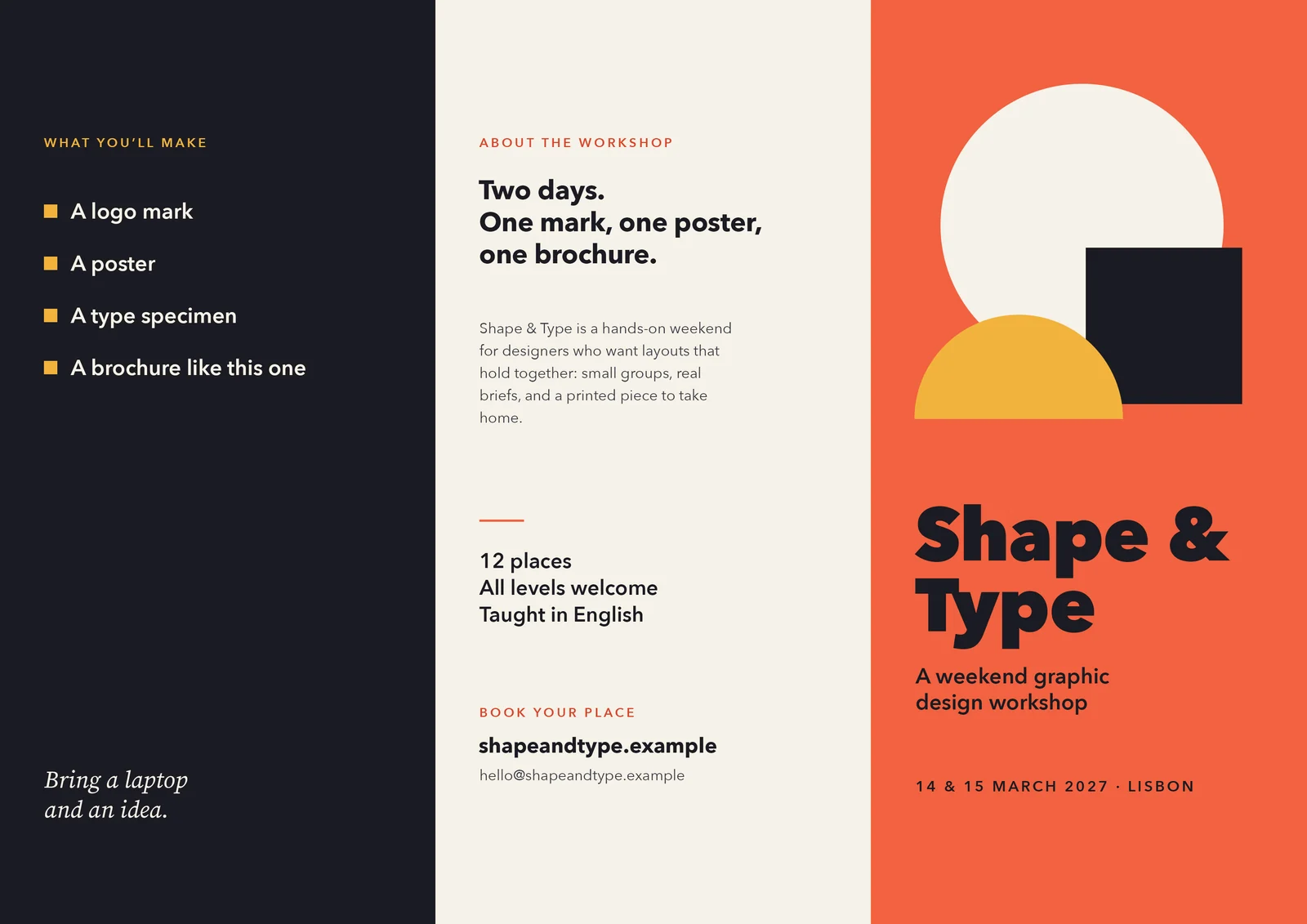
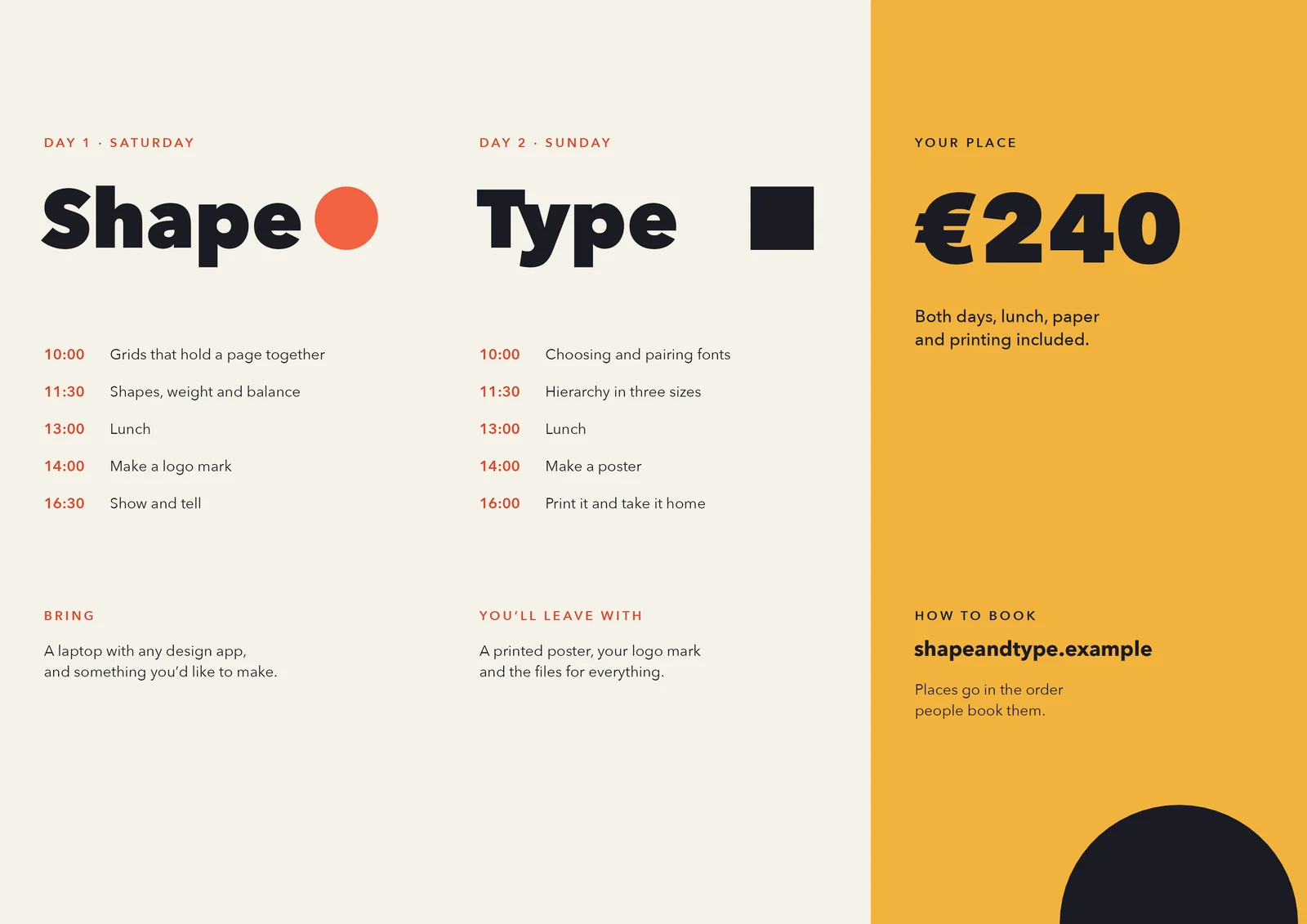
How a tri-fold is laid out
A4 landscape, 297 × 210 mm, folds into three panels about 99 mm wide. The outside, left to right: the flap that folds in, the back, and the cover. The inside reads left to right across three panels. Claude made each side a 303 × 216 mm document at 300 ppi, 3 mm of bleed on every side, with text kept 10 mm from the edges of each panel. For print, the panel that folds in is often 1 to 2 mm narrower: ask your printer for their template.
What Claude made
- The cover: coral, with a cream circle, an ink square and a mustard half circle, and “Shape & Type” in a heavy sans.
- The back: what the workshop is, three facts, and how to book.
- The flap: what you'll make, with mustard squares for bullets.
- Inside: Day 1, Shape, and Day 2, Type, each with its schedule in two aligned columns, and a mustard panel with the price and how to book.
Three colours plus ink and paper, two type families, and the same margins on every panel.
What it took
| Time | AI credits | Layers |
|---|---|---|
| 3 minutes 23 seconds, both sides | None | 22 outside, 25 inside |
With photos
This one is shapes and type only, to show what's free. For a brochure with photos, a yoga studio, a hotel or a property, ask for them: Radbin's image models make them for credits, and Claude says the price first. Or open your own photos and ask Claude to lay them into the panels. For pages full of photos, see the furniture catalog Claude made: room photos and product cut-outs that match, for 19 credits.
Make yours
Connect Claude or ChatGPT to Photoshop with Radbin, then ask:
Design a tri-fold brochure for [my bakery's catering menu], A4 landscape with 3 mm bleed at 300 ppi, the outside and the inside as two documents. Cover: [the name and one line]. Back: [about us and how to order]. Inside: [three menus with prices]. [Warm and simple], two fonts I have installed, every element on its own named layer.
More real jobs, done by AI in Photoshop
- AI in Photoshop: every way to use it
- Web design in Photoshop with AI
- Poster and flyer design in Photoshop with AI
- YouTube thumbnails in Photoshop with AI
- Virtual staging in Photoshop with AI
- Business card design in Photoshop with AI
- Catalog design in Photoshop with AI
- Mobile app design in Photoshop with AI
- Label design in Photoshop with AI
- Photoshop automation: actions, batch and AI agents
- Claude in Photoshop prompts that worked
- How to connect Claude to Photoshop, or ChatGPT
Connect your AI app to Photoshop, free
Radbin gives Claude, ChatGPT and other AI apps Photoshop's own tools and a playbook of how a professional edits. Connecting is free, and a free account adds 40 credits for Radbin's AI models.
Watch Radbin on YouTube
Real tests and tutorials, inside Photoshop and Premiere. See the whole channel.
 21:44Photoshop 2027 new features vs Radbin
 19:57Claude Opus 5.5 edits my video in Premiere Pro
 16:20GPT Image 2.6 in Photoshop: images, vectors and GIFs
 7:37Upscale a low res portrait to 4K in Photoshop
 19:25Relight any photo in Photoshop with AI
 20:03Nano Banana 2.1 vs GPT Image 2 and FLUX 3: ten tests
 14:31Photoshop Relight vs Radbin Lightsmith
 10:24Retouch skin without losing the texture
 9:28Every Radbin tool in 9 minutes
 9:50Fix the focus of any photo after it was taken
 1:43Radbin changes only what you ask