FreeTry it with 40 credits. No card →

Retakes out. Zooms in.
Edited inside Premiere.

Claude Opus 5.5 reads your talking-head or tutorial recording like an editor: it cuts the retakes and long pauses, lays out your camera and screen, adds zooms, titles and captions, and builds a new sequence. Your original stays as it was.

No card · Premiere Pro 26.3 or newer · Mac and Windows
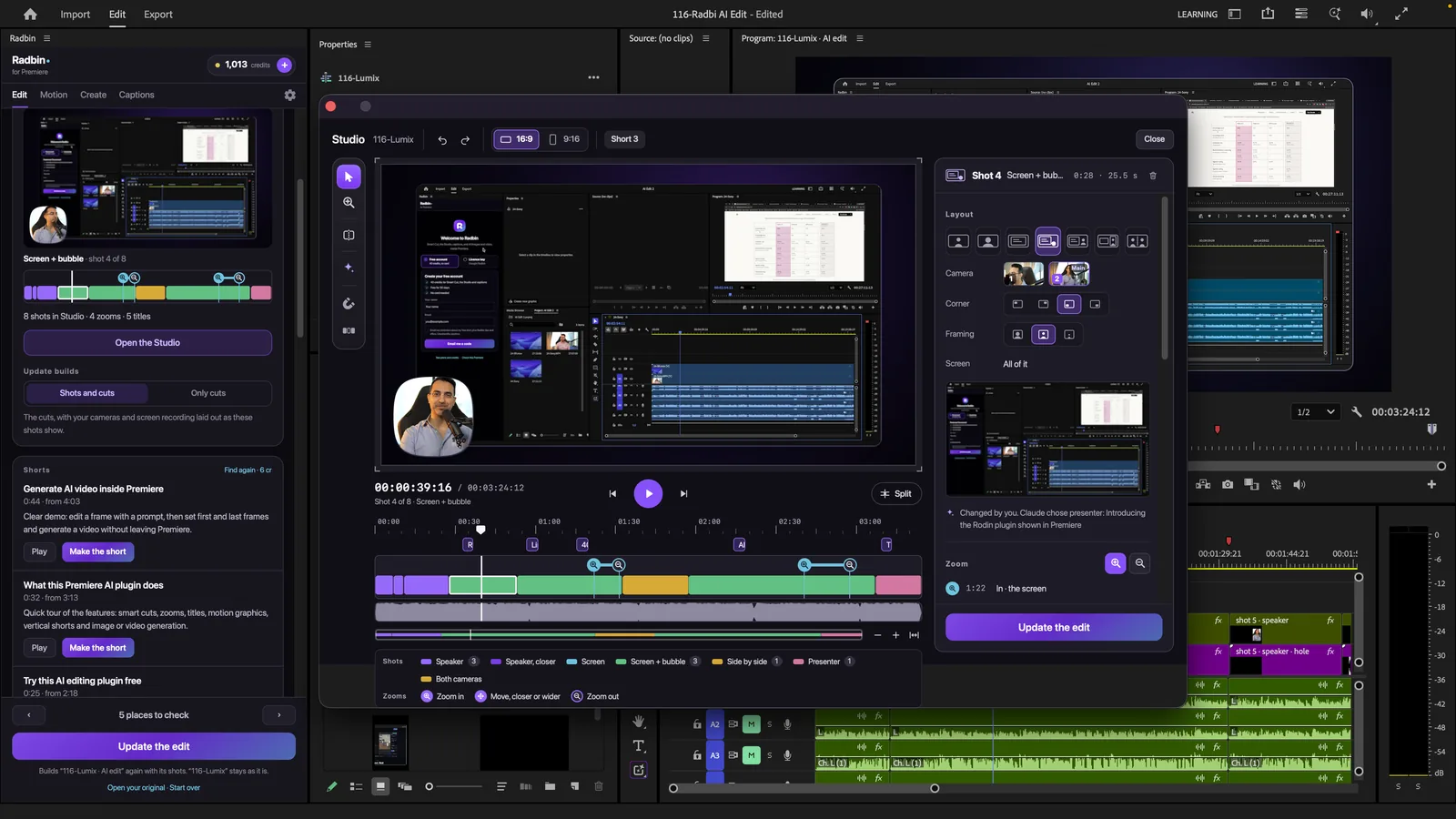
Premiere Pro · Radbin and its Studio
Premiere Pro with the Radbin panel on the left and Radbin's Studio open over the project: the edit's shots on a timeline, a camera in a bubble over a screen recording
A real edit

5:15 of raw talk. 3:25 after AI Edit.

The first five minutes of our launch video, recorded with the mistakes left in. In about a minute and a half, AI Edit removed 12 parts and shortened a long pause, then planned 8 shots with 4 zooms and 5 titles.

~90 sto edit itAI Edit, start to finish
12parts removedretakes, restarts and a pause
24creditsfor the full edit

Every cut, with its reason.

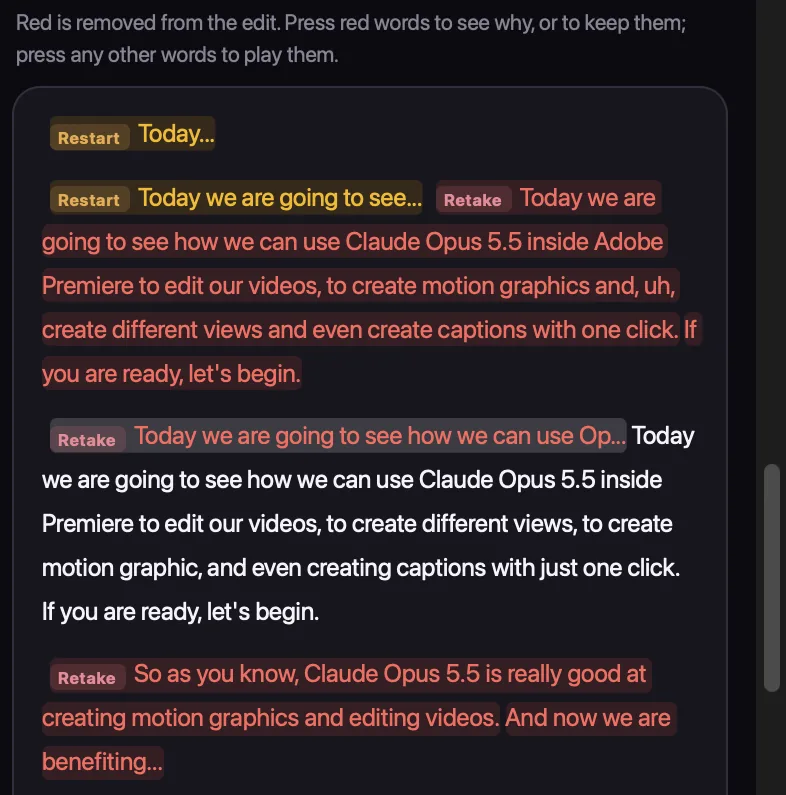
The panel shows the length before and after, what it took out and why, and anything it wasn't sure about. Press a cut to hear it, keep it, or move on.

  1. 1Retakes and restarts, marked in red
  2. 2Unsure? It asks you first
  3. 3Your shots, zooms and titles, ready in the Studio
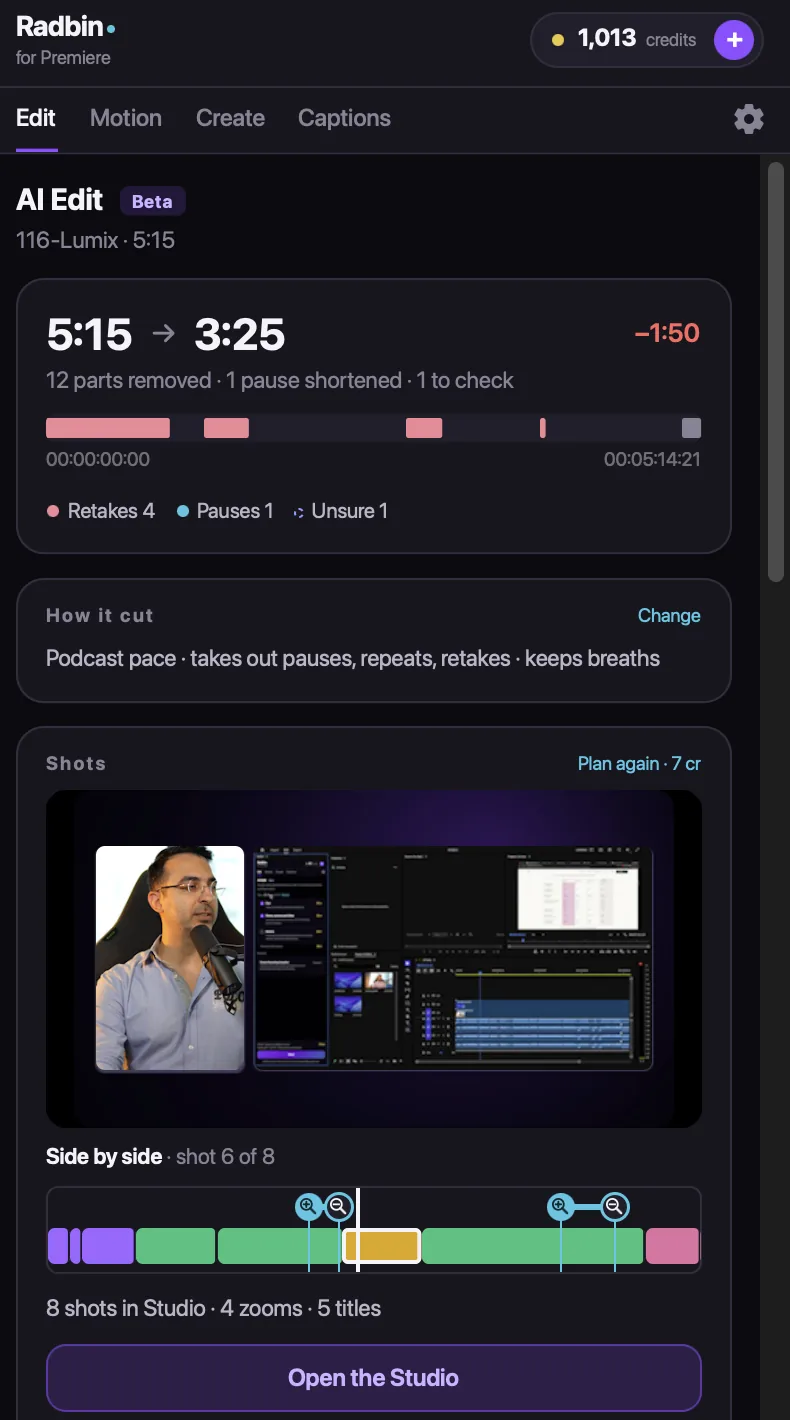
The Edit tab after AI Edit: 5:15 to 3:25, 12 parts removed, the shots planned and the Open the Studio button
Watch

Watch it edit the video it is in.

How it works

Press AI Edit. Check it. Update.

Radbin's Edit tab in Premiere after a run
1Press AI EditOpen your sequence, choose what AI Edit should do, and press it. The price is on the button.
The transcript with retakes and restarts marked in red
2Check the cutsRemoved words are red, each with its reason. Keep any of them with one press.
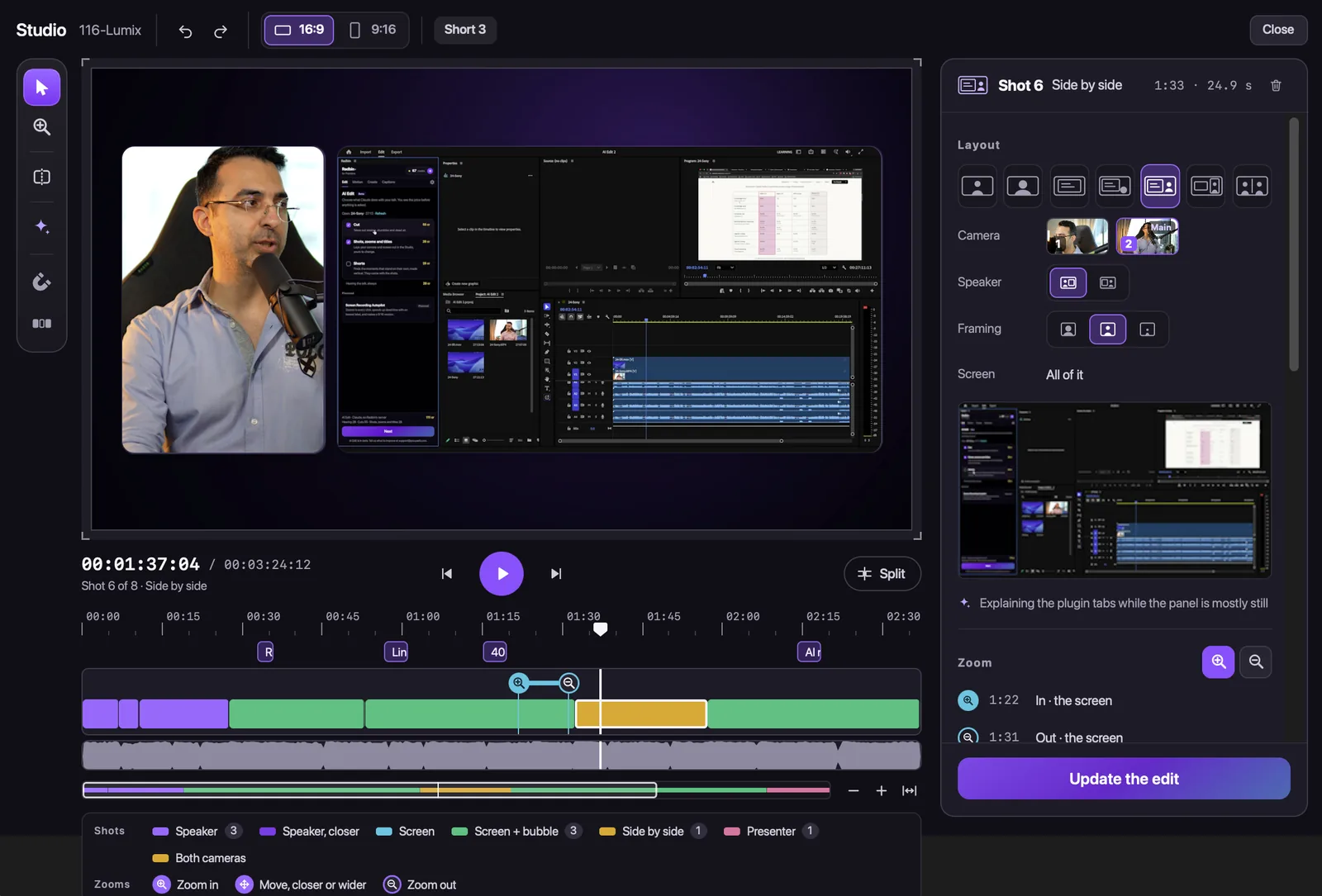
Radbin's Studio: a shot laid out side by side, with its timeline of shots and zooms
3Press UpdateChange shots, zooms and titles in the Studio. Premiere gets a new sequence; your original stays as it was.
Smart Cut

It keeps your best take.

Retakes, restarts and long pauses come out. Claude reads what you meant to say, so the version you finished is the one that stays. You choose the pace, from tight to relaxed.

  1. 1Retakes and restarts out
  2. 2Long pauses shortened or out
  3. 3Unsure? It asks you first
Your original stays as it was
Retakes and restarts marked in red in the transcript
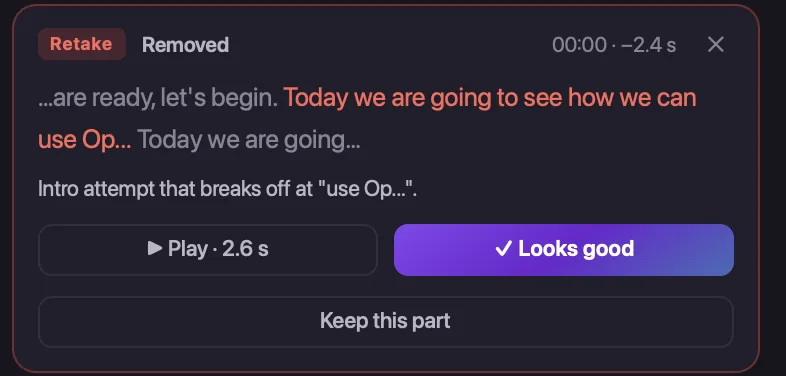
A removed retake with its reason, a Play button, Looks good and Keep this part
The Studio

Camera and screen, laid out like an editor would.

When you talk to the camera, you fill the frame. When you show something, the screen comes in, with you in a bubble or side by side. Filmed with two cameras? It cuts between them.

  1. 1Seven layouts, one press each
  2. 2Two cameras and a screen recording
  3. 3Move, split or delete any shot
Radbin's Studio: a side-by-side shot of the speaker and the screen, the layouts on the right, the shots and zooms on the timeline
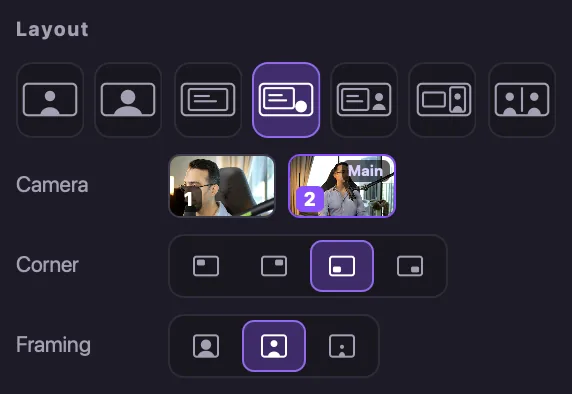
The layouts, the camera choice, the corner and the framing for one shot
Zooms and titles

Zooms where your words point. Titles on the word.

Say “click here” and the screen zooms in on it. Make a strong point and the camera moves closer. Titles appear on the word they belong to, animated, in your colour.
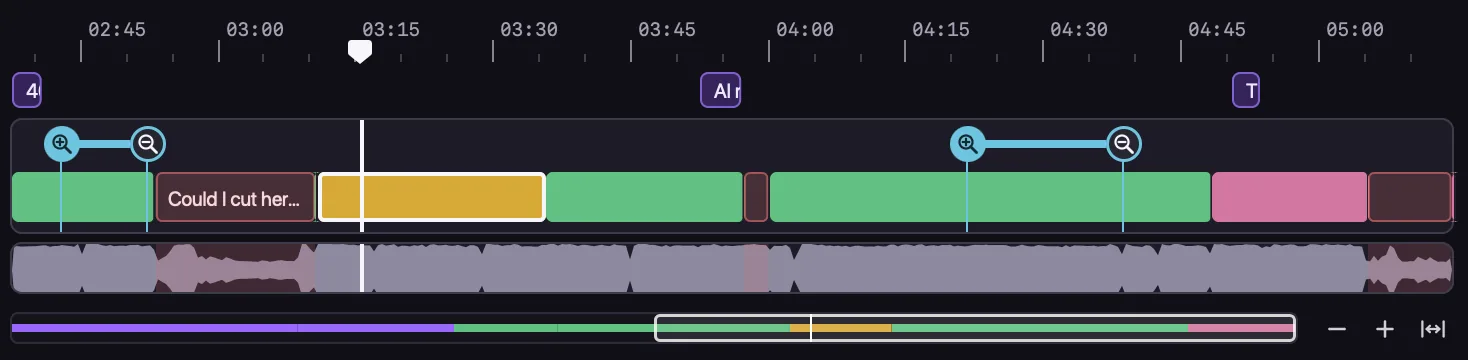
The Studio's timeline: shots in colour, two zooms in and out, and title marks above
Drag any zoom or title to move itAsk Claude to write a title againSimple, medium or advanced motion
Shorts

One video. Shorts ready to post.

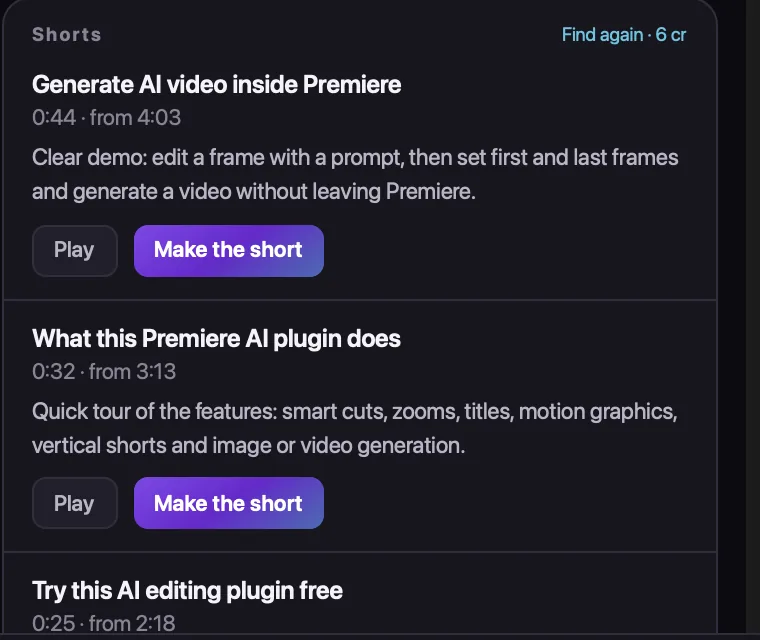
Radbin finds the moments that stand on their own and tells you why each one works. Press Make the short and it becomes its own vertical edit.

  1. 1Moments that stand on their own
  2. 2One press makes the short
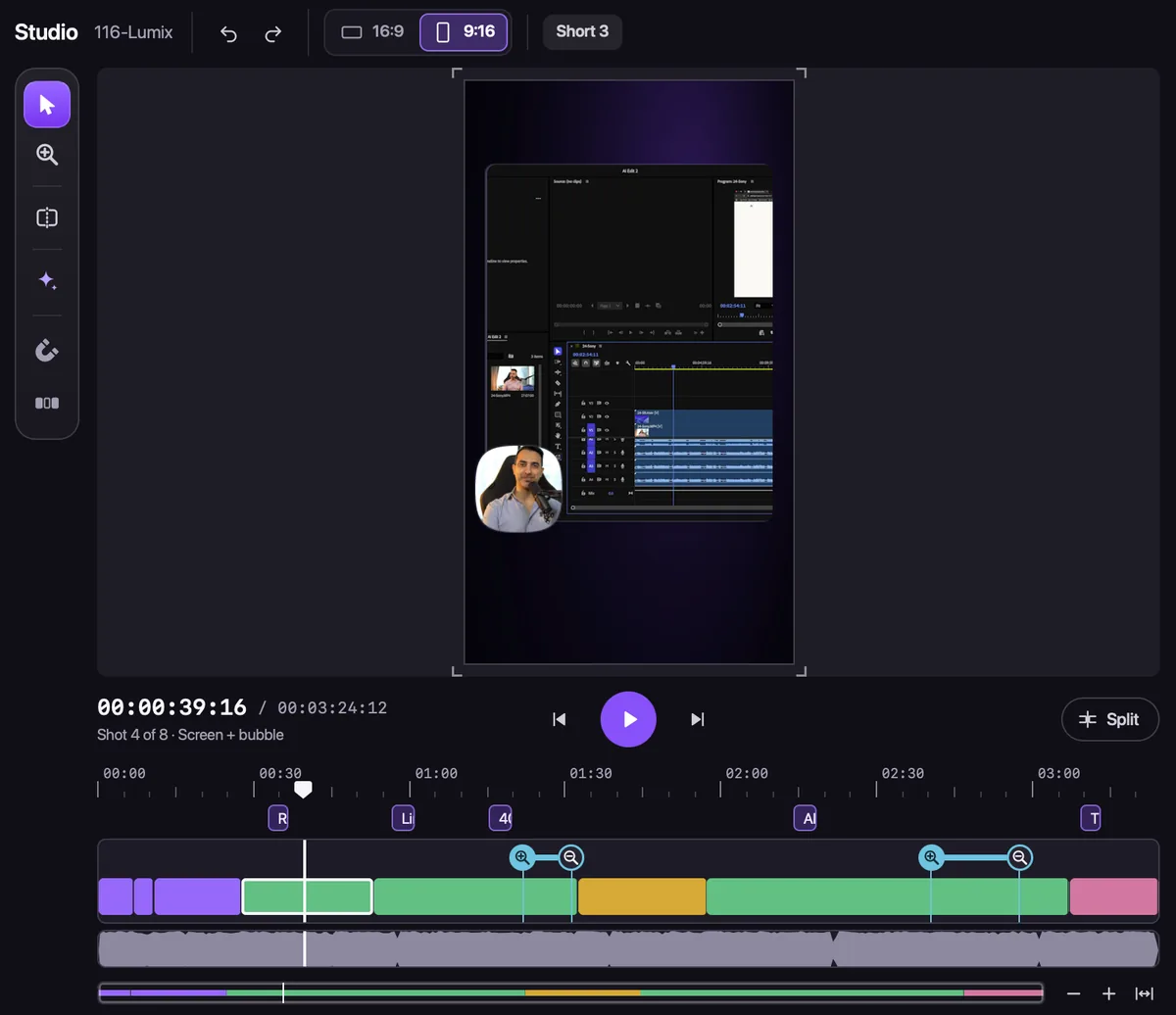
  3. 3Every layout works in 9:16
The Studio in 9:16: the screen recording with the speaker in a bubble, for a vertical short
Three shorts found in one video, each with its length, where it starts, why it works, Play and Make the short
Captions

Captions that light up word by word.

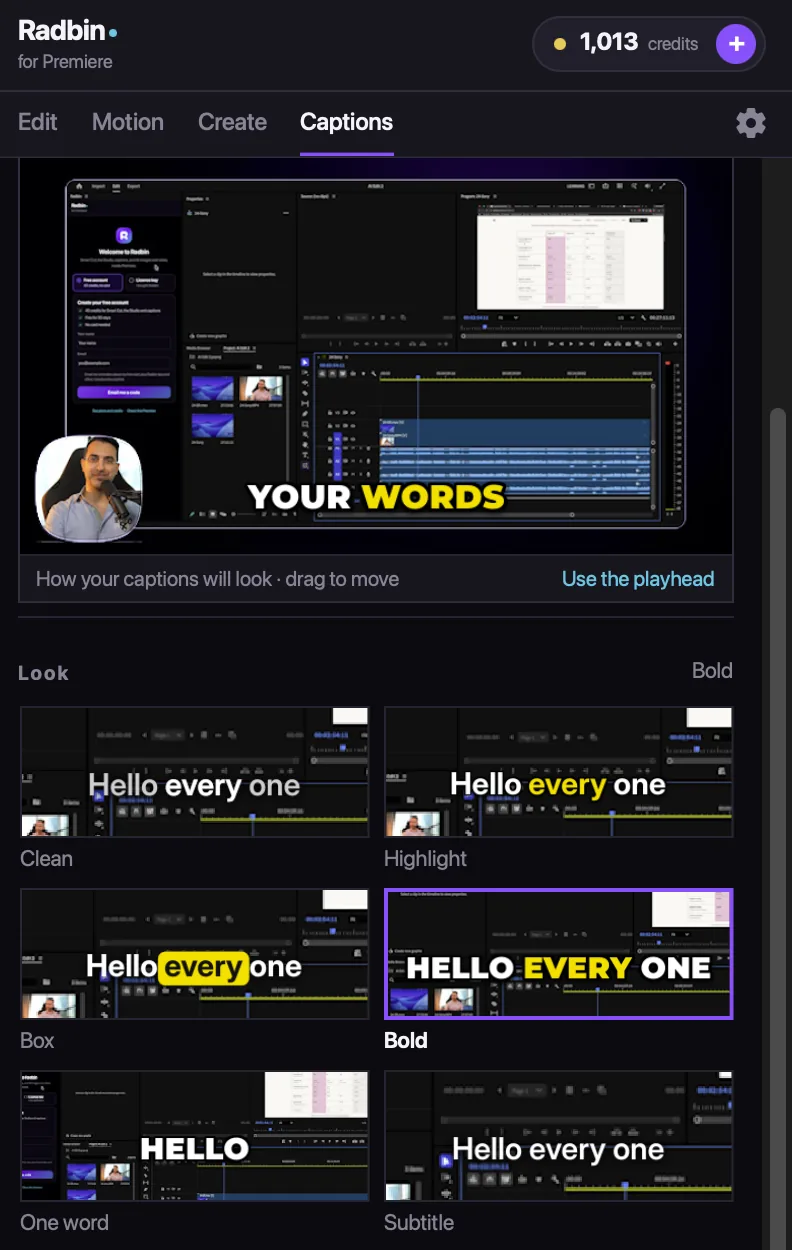
Six looks, your colour, top or bottom, cut or fade. They land on their own track in your sequence, with an SRT file for YouTube.

  1. 1Six looks, previewed on your video
  2. 2Your colour and your position
  3. 3An SRT file comes with them
1 credit a minute
The Captions tab: a preview on the video and six looks: Clean, Highlight, Box, Bold, One word and Subtitle
Create

Images and clips from the frame you're on.

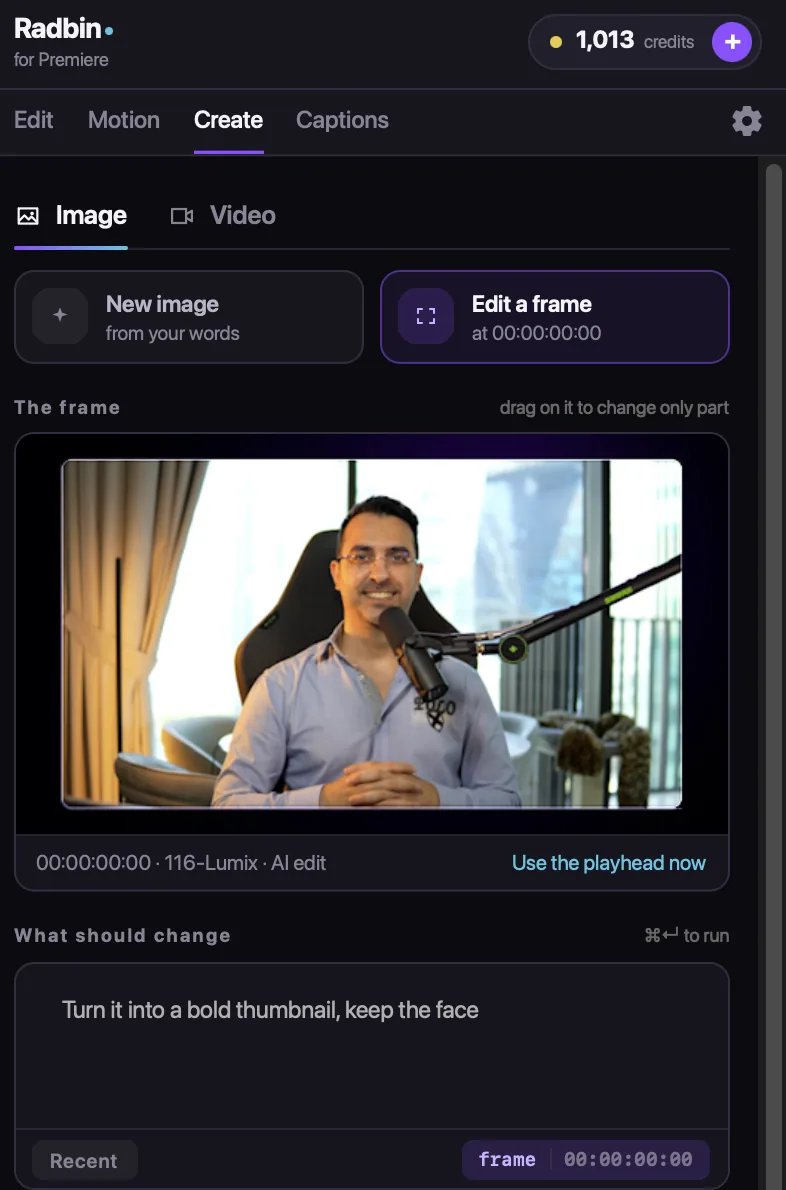
Edit the frame at your playhead with a sentence, or give two frames and get the clip between them. Eleven image models and four video models, and the result lands on your timeline.

  1. 1Edit a frame with your words
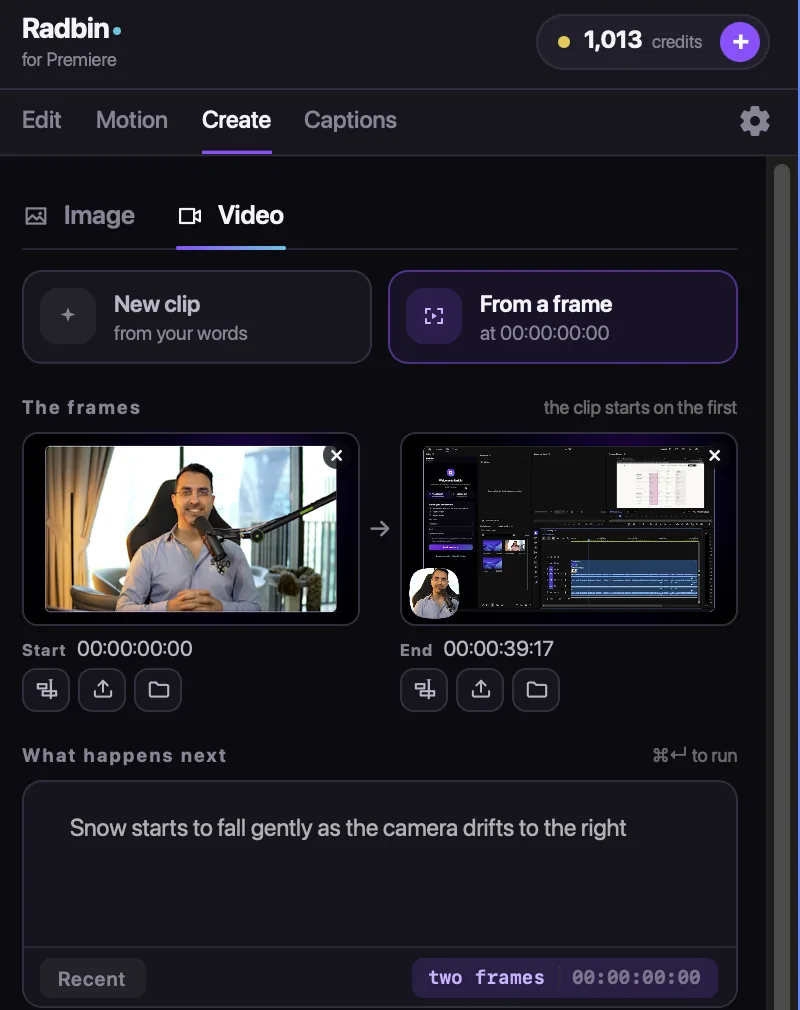
  2. 2A clip from a first and a last frame
  3. 3It lands at your playhead
With any plan
The Create tab, Video: a clip from a start frame and an end frame
The Create tab, Image: editing the frame at the playhead with a sentence
Try it free

40 credits. 30 days. No card.

About 10 minutes of full AI editing, on your own videos. Four steps, and the first one is a download.

  1. 1DownloadRadbin for Premiere: one .ccx file, the same for Mac and Windows.
  2. 2InstallDouble-click it. Creative Cloud installs it for you.
  3. 3OpenIn Premiere: Window › UXP Plugins › Radbin.
  4. 4StartCreate your free account: your name, your email and the code we send you.

AI Edit only: creating images and videos needs a plan. One free start per person and per computer. Choose a plan in your first 3 days and we add +250 bonus credits (750 on a yearly plan).

Pricing

The same Radbin plan. Photoshop and Premiere.

AI Edit costs about 4 credits a minute of video. A 10-minute video is about 40 credits: $1.40 to $2, depending on your plan.

AI EditCredits
Full edit: cuts, shots, zooms, titlesat least 154 a minute
Cuts onlyat least 83 a minute
Captionsat least 41 a minute
Find shortsat least 21 a minute
A title written againeach2
Every Studio change, every Updatefree

Past 30 minutes, cuts cost half. A failed run gives its credits back. Images and clips in Create cost what they cost in Photoshop. Every price →

Starter
$8.25/month $9.97
$99 a year · you save $20
200credits
every month
About 40 photo results, or 50 minutes of AI Edit, a month.
  • Every tool, every recipe, every model
  • Photoshop and Premiere, one key
  • No API keys, nothing else to set up
  • Run 4 jobs at the same time
  • Use it on 3 computers
Get my 200 credits
Cancel anytime
Most popular
Pro
$24/month $29
$290 a year · you save $58
750credits
every month
About 150 photo results, or 3 hours of AI Edit, a month.
  • Every tool, every recipe, every model
  • Room for 4K on your best work
  • Run 8 jobs at once, 4 more queued
  • New tools and recipes reach you first
  • Use it on 3 computers
Founding seat: 1,125 credits/mo for life · Only 16 left → Get my 750 credits
Cancel anytime
Max
$57.50/month $69
$690 a year · you save $138
2,000credits
every month
About 400 photo results, or 8 hours of AI Edit, a month.
  • Every tool, every recipe, every model
  • 4K on everything, all month
  • Run 12 jobs at once, 8 more queued
  • The lowest price per credit
  • Use it on 3 computers
Get my 2,000 credits
Cancel anytime
Secure checkout by Kajabi Cancel anytime, in two clicks Only charged for finished results One licence, three computers
Questions

About Radbin for Premiere.

What is Radbin for Premiere?
A panel for Adobe Premiere Pro that edits your videos with AI. Claude Opus 5.5 reads your recording, takes out retakes and long pauses, plans the shots for your camera and screen, and adds zooms, titles and captions in a new sequence you can change in the Studio. It also makes images and video clips from your frames. It is part of Radbin: the same account, plan and credits as Radbin for Photoshop.
Which Premiere Pro versions and computers?
Premiere Pro 26.3 or newer, on Mac and Windows. One licence works on three computers; a free account works on the computer it was made on.
Does it change my original sequence?
No. AI Edit builds a new sequence next to yours, named after it. Change anything in the Studio and press Update as often as you like; your original stays as it was.
What videos does it edit?
Talking-head videos, tutorials and screen recordings, with one or two cameras. It edits by what you say, so the video needs speech.
Is my video uploaded?
Your video files stay on your computer. Radbin sends the sound, plus a few small stills when Claude needs to see which video is your camera and which is your screen. We never train on your content.
What does it cost?
About 4 credits a minute of video for a full edit with cuts, shots, zooms and titles, and 1 credit a minute for captions. A 10-minute video is about 40 credits. Plans start at $9.97 a month for 200 credits. Every Studio change and every Update is free, and a failed run gives its credits back.
Can I try it before I pay?
Yes. Create a free account in the panel: 40 credits for AI Edit, for 30 days, no card. One free start per person and computer. Creating images and videos needs a plan.
Which languages does it understand?
We tested English and Persian. Most languages the speech model knows work too; try a short clip of yours first.
I already have Radbin for Photoshop. Do I pay again?
No. Your plan, key and credits work in both apps. Download Radbin for Premiere and sign in with the same key.
Not open yet

Radbin opens Monday 28 September.

At 11:00 New York time. Leave your email and get the link 5 minutes early.

You will also get our launch emails. Unsubscribe anytime.