 Radbin
Radbin for Premiere edits your talking-head and tutorial videos with AI, inside Premiere Pro. What it does is on the Radbin for Premiere page; this guide gets you to your first edit.
What you need
Premiere Pro 26.3 or newer, on a Mac or a Windows PC, with Creative Cloud Desktop. To see your version, open Premiere Pro › About Premiere Pro on a Mac, or Help › About Premiere Pro on Windows.
1. Download
Download Radbin for Premiere. It is one file ending in .ccx, the same for Mac and Windows.
2. Install
Double-click the file. Creative Cloud Desktop opens and asks to install Radbin; click Install. If Premiere was open, quit it and open it again.
3. Open the panel
In Premiere: Window › UXP Plugins › Radbin. Dock it where you like; it opens there next time.
4. Sign in
New to Radbin? Choose Free account, type your name and email, and press Email me a code. Type the six-digit code from the email and press Start free. You get 40 credits for AI Edit, for 30 days, on this computer. No card.
Already have Radbin? Choose Licence key, paste the key from your email and press Activate. It is the same key, plan and credits as Radbin for Photoshop.
5. Your first AI edit
- Open the sequence you want edited. To edit only part of it, mark an In and an Out.
- On the Edit tab, choose what AI Edit should do. The price is on the button; press it.
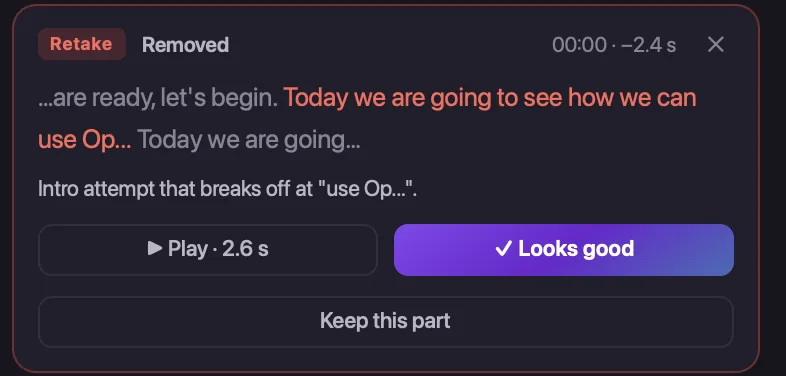
- Check the cuts. Removed words are red, each with its reason. Press one to hear it, keep it, or move on.
- Press Open the Studio to change shots, zooms and titles, then Build the edit. Premiere gets a new sequence named after yours. Your original stays as it was, and every later Update the edit is free.
Captions
On the Captions tab, pick a look, a size, a place and a colour, and add them. They are drawn on their own track, with an SRT file for YouTube. Captions cost 1 credit a minute.
If something doesn't work
- No Radbin under Window › UXP Plugins: quit Premiere and open it again after installing.
- Creative Cloud won't install it: update Creative Cloud Desktop and Premiere, then double-click the file again.
- “Your free start works on the computer you started it on”: a free account works on one computer. A plan works on three.
- Anything else: in the panel, open the gear, then Check this Premiere, and send what it shows to support@pouyaeti.com.
Updating
When a new version is out, a bar appears at the top of the panel. Press Update; you stay signed in.