 Radbin
Recipes are the third tab of the Radbin panel: 48 one-click looks for portraits, styles, stickers and thumbnails. When you want to type a prompt instead, that is the Create tab.
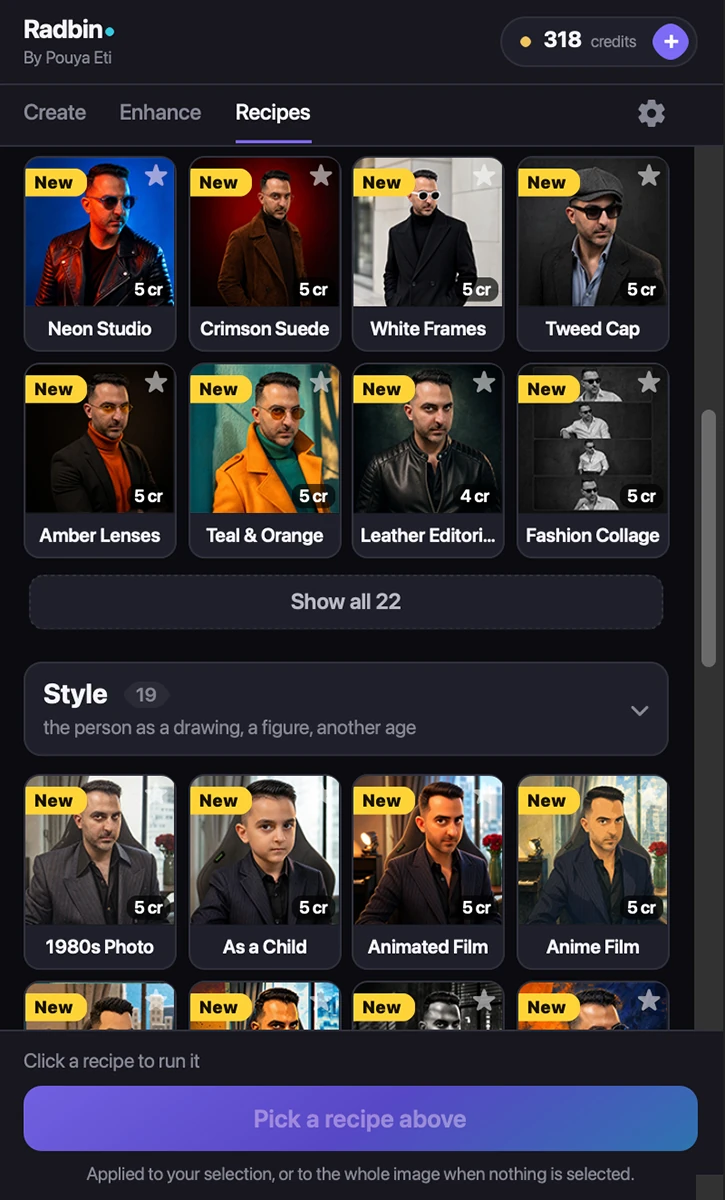
Running a recipe
- Open a photo with a person in it. A clear face gives the best results.
- Go to the Recipes tab. Select the area you want the look applied to, or select nothing and Radbin uses the whole image.
- Click a card. The price is on the card; the result arrives as a layer named after the recipe.
The rows
- Portrait: a new look for the person in your photo, from studio editorials to neon.
- Style: the person as a drawing, a painting, a figure, another age.
- Fun: stickers, emoji and silly 3D versions of you.
- Creator: thumbnails and posters for your videos.
- Popular appears at the top once enough people have run things: what the community clicks most.
Favourites and search
The star on a card puts it in Your favourites, the first row, and follows your account to every computer. The search box narrows by name. New recipes wear a yellow New tag for a month and sit at the top of their row.
Why the prompts are not in the plugin
Recipes live on our side. That is what lets us add new ones, reword them and move them to better models without you reinstalling anything, and it is why a recipe keeps getting better after you paid for it.