 Radbin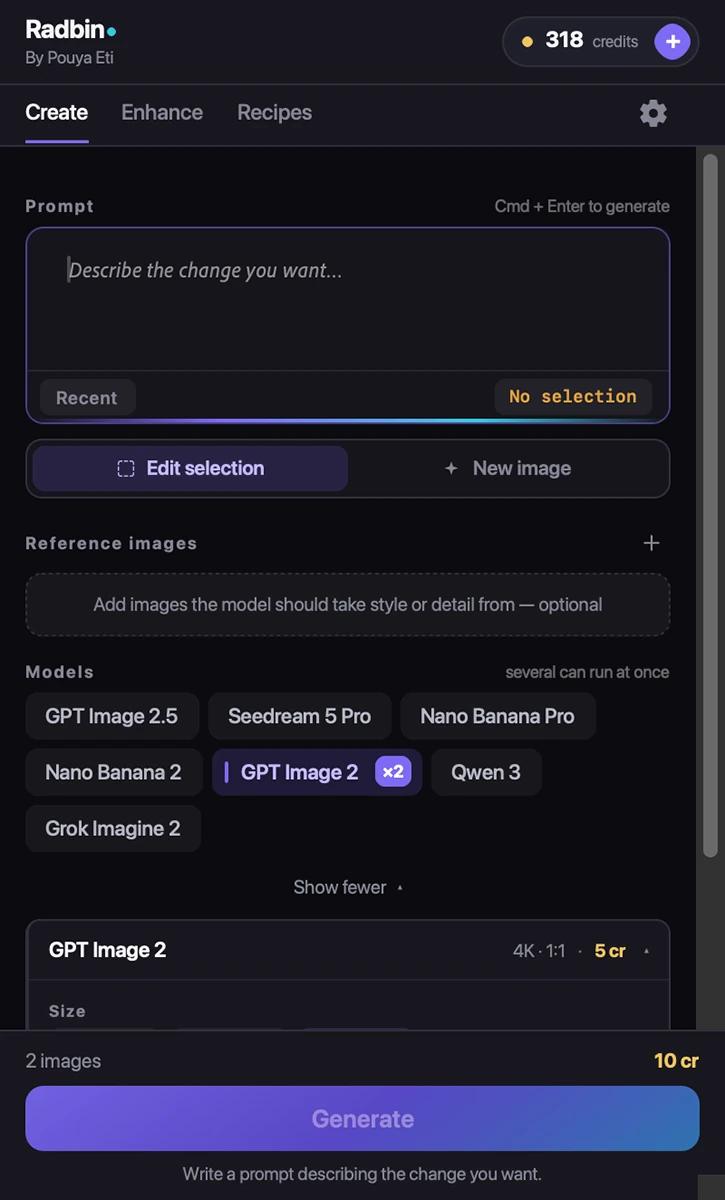
What Create does
Create is Radbin's prompt tab for Adobe Photoshop. It puts seven leading image models behind one prompt box: GPT Image 2.5, GPT Image 2, Nano Banana Pro, Nano Banana 2, Seedream 5 Pro, Qwen 3 and Grok Imagine 2. With a selection, the models edit that area of your photo; with nothing selected, they generate a new image into a new file or a new layer. Reference images can be added for style or detail, and size and shape chips set the output. Radbin holds the API keys and the credits, so there is nothing to set up, and new models are added on the server without a plugin update. A 1K image costs from 2 credits, a 4K image 5.
How it works
- 1Select the area to edit, or nothing to generate a new image
- 2On the Create tab, pick a model, write the prompt, add reference images if you want, choose the size
- 3Click Generate. The result lands as a layer, or as a new document if you chose one
What it costs
| Size | Credits |
|---|---|
| GPT Image 2 · 1K / 2K / 4K | 2 / 3 / 5 cr |
| Nano Banana 2 · 1K / 2K / 4K | 3 / 4 / 5 cr |
| Other models | shown on the button |
One credit is one credit on every tool. A failed job refunds itself, and the exact cost shows on the button before you click. How credits work.