 Radbin
The short answer: install the free Radbin plugin in Photoshop and start a free account. Then in Claude open Customize › Connectors, choose Add › Add custom connector, name it Radbin, paste https://mcp.radbin.ai/mcp, and click Continue twice, then Add and Allow. Claude's free plan can add one custom connector, so connecting costs nothing.
Full disclosure: I make Radbin. Adobe has announced its own way for agents to work in Photoshop files, but it starts as a private beta in early 2027 (Adobe, 10 November 2026), so this is the way that works today. Everything below comes from my own setup on 23 November 2026, in Photoshop 2027 and Claude on the web.
What you need
- Photoshop 2023 (24.2) or newer, on a Mac or a Windows PC.
- A Claude account. The free plan works, since it can add one custom connector. A paid plan gives Claude more room on long jobs.
- Radbin for Photoshop, free. A free account starts with 40 credits for Radbin's AI models, for 30 days, with no card.
Claude reaches your Photoshop over the internet, through Radbin's server, so nothing runs on your computer but Photoshop and the Radbin panel. Photoshop has to stay open while Claude works.
1. Install Radbin in Photoshop
Download Radbin from radbin.ai/download/photoshop. It's one .ccx file for Mac and Windows: double-click it and Creative Cloud installs it into Photoshop.
There's no MCP server to install and no command line. The server is online at mcp.radbin.ai, and the panel inside Photoshop carries out each step.
2. Start a free account
In Photoshop choose Plugins › Radbin. Under New to Radbin? Start free, type your name and email and press Email me a code, then type the six-digit code and press Start free. Already have Radbin? Activate it with your licence key instead.
3. Open the MCP tab and press Claude
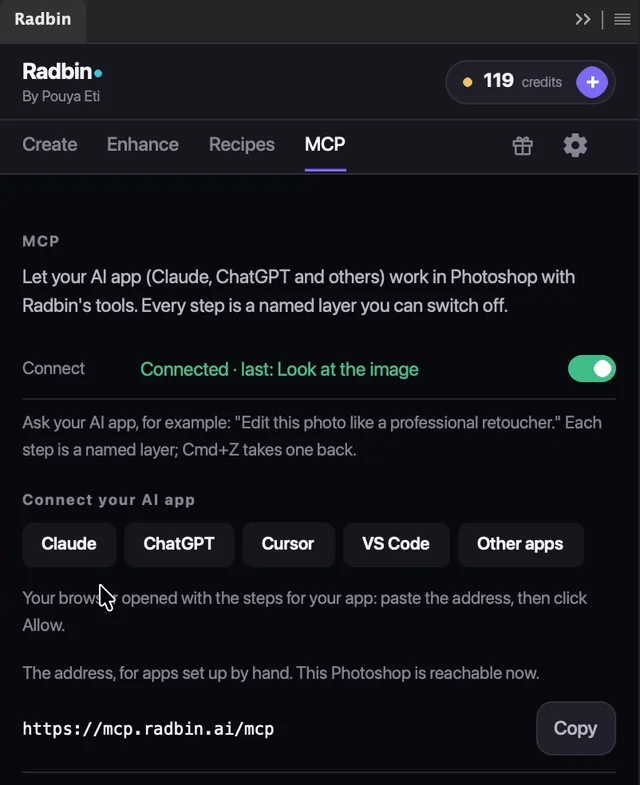
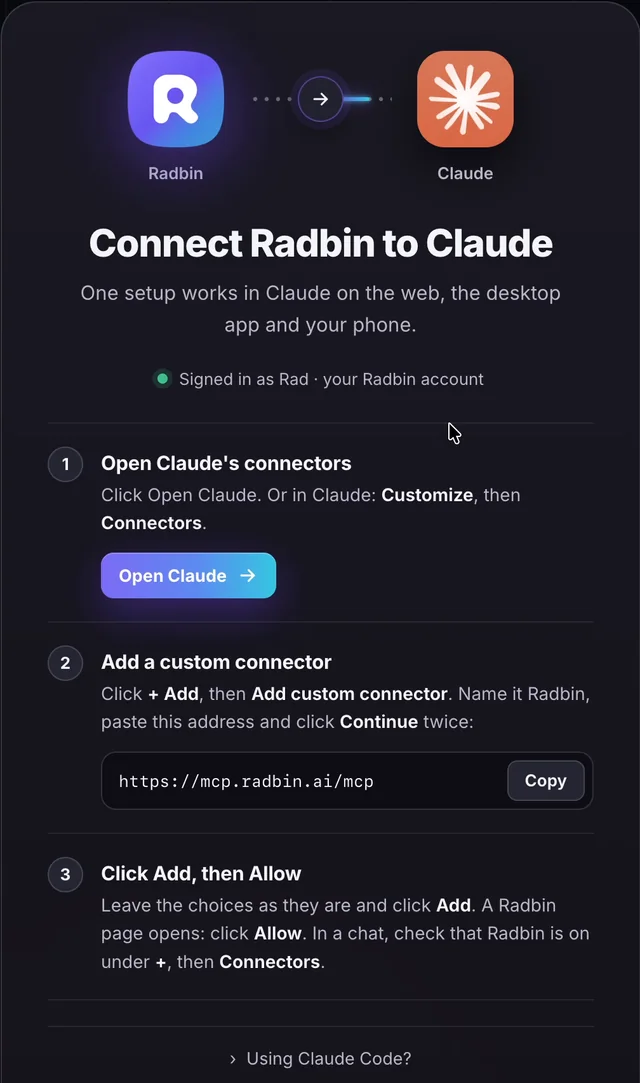
In the Radbin panel, open the MCP tab and check that Connect is on. Then press Claude. Your browser opens a Radbin page with Claude's steps, already signed in to your Radbin account.
4. Add Radbin as a custom connector
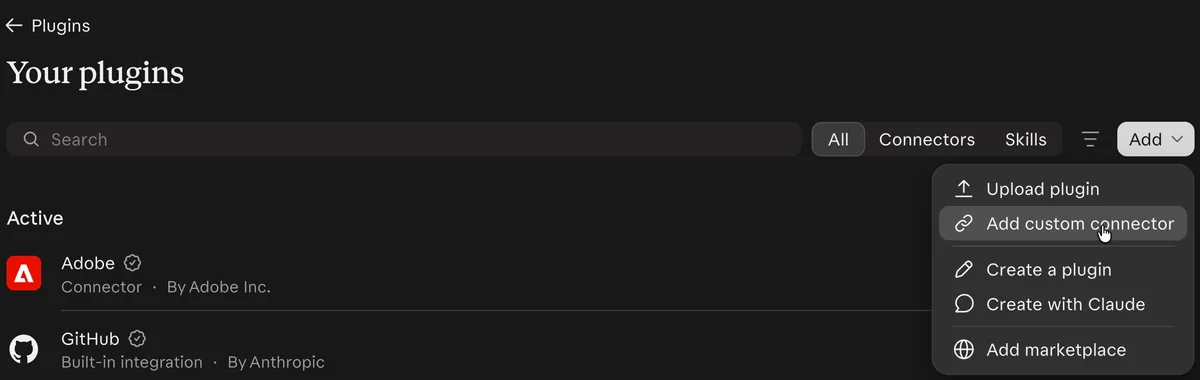
Click Open Claude on that page, or in Claude open Customize, then Connectors. Claude lists its connectors on a page called Your plugins. Click Add, then Add custom connector.
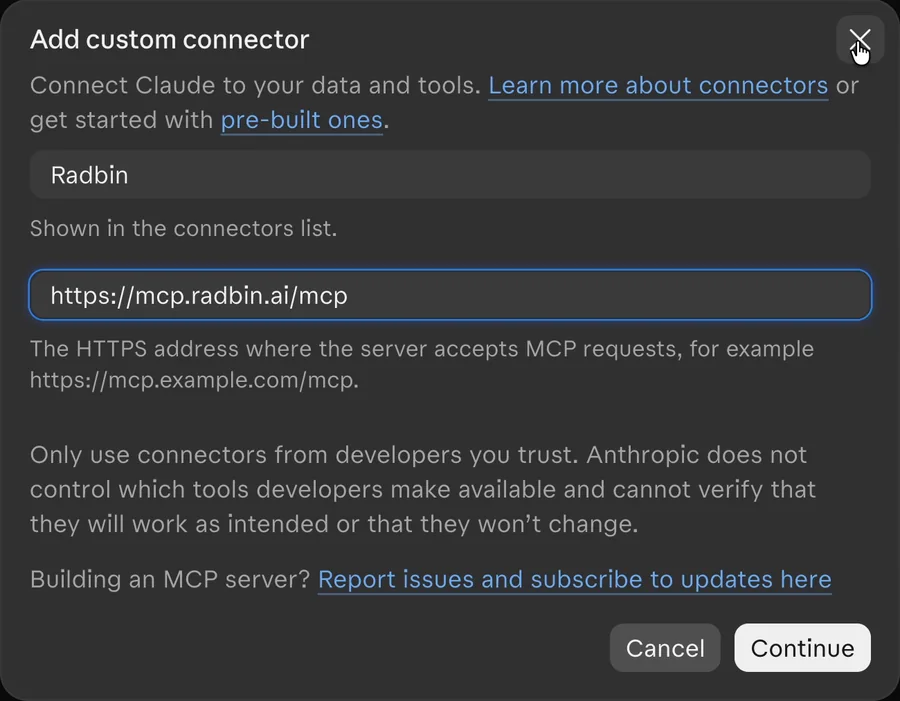
Type Radbin as the name, paste https://mcp.radbin.ai/mcp as the MCP server URL and click Continue. Claude checks the server: it connects, looks up the sign-in settings and checks the sign-in provider. When the check is done, click Continue again.
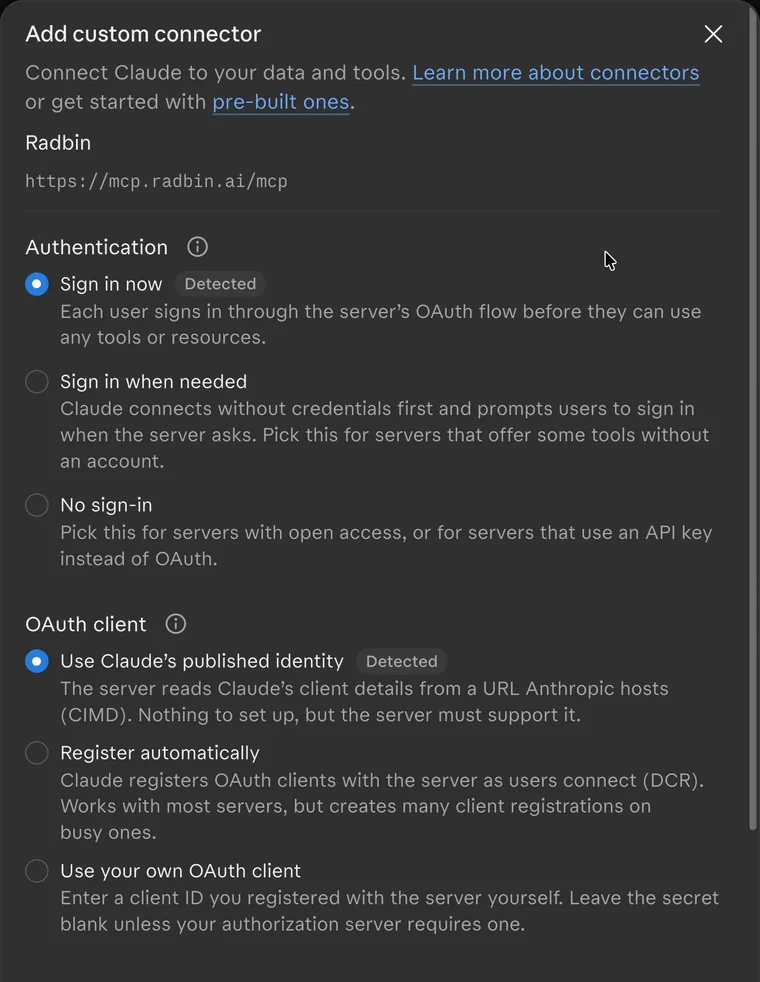
5. Keep the sign-in settings, then Add
The next screen is about how Claude signs in. It finds the right choices by itself, Sign in now and Use Claude's published identity, and marks them Detected. Leave them as they are, scroll down and click Add.
6. Allow
A Radbin page opens and asks: Let Claude work in your Photoshop? It lists what Claude can do: see and edit the photos open in Photoshop, step by step as named layers, while the panel is connected, and use your Radbin credits only for AI models, saying the price first. And what it can't: see your payment details or your password. Click Allow, and Claude shows Connected to Radbin.

7. Check it in a chat
Start a new chat. Under +, then Connectors, check that Radbin is on. Then ask something simple, like What is open in my Photoshop? Claude calls Radbin, looks at the document and describes it.
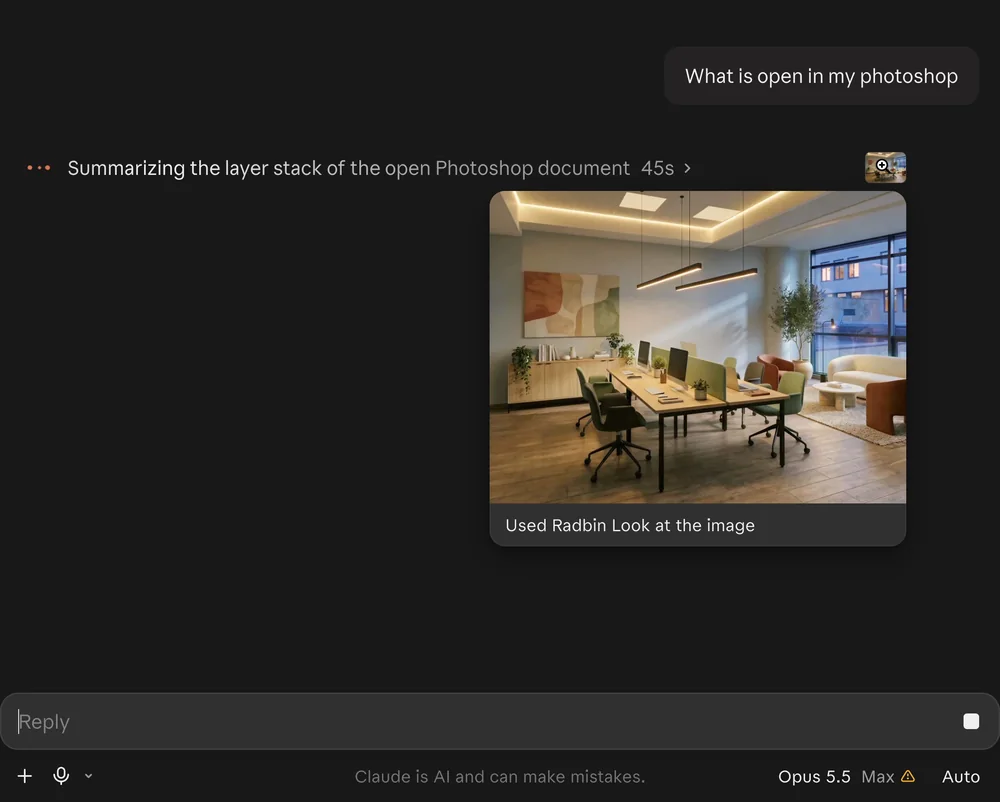
That's the setup. From here you ask in plain words, with the photo open in Photoshop.
Stop the approval clicks
Out of the box, Claude asks before each tool it uses: a click for every step of a long edit. To let it work, open Customize › Connectors, click Radbin, open Permissions, and set each group of tools to Always allow.

What changes: Claude stops asking, also before it runs one of Radbin's AI models, which use credits. It still tells you the price before it starts, and Radbin's rules have it ask first when a job would cost more than 50 credits. To stop it at any moment, switch Connect off in the MCP tab.
What to ask first
Ask the way you'd brief a retoucher: what the photo is, what it's for, and what to keep. Three to start with:
- Develop this raw like a portrait retoucher. Keep it natural. Free: Photoshop's own tools.
- Make a YouTube thumbnail from this photo with the title “I tried it”. Free, unless Claude decides it needs an AI model, and then it says the price.
- Remove the people in the background. Uses credits: one of Radbin's AI models.
The exact prompts from my video, for an office, a Christmas poster and a magazine cover, are in Claude in Photoshop prompts that worked.
Want the prompts as a PDF? Every prompt from my video, 10 follow-ups, 20 more Photoshop jobs and 12 tips, in a free 12-page guide. Send me the PDF.
What it costs
| What | Cost |
|---|---|
| The Radbin plugin and the connector | Free |
| Photoshop's own tools through Radbin: adjustment layers, masks, Camera Raw, skin retouching, type, exports | Free |
| Radbin's AI models: generating, removing, upscaling, AI skin retouching, restoring | Credits: 40 free to start, then plans from $9.97 a month for 200 |
| Claude | The free plan works; a paid plan gives more room on long jobs |
For scale, from my video: the office took 14 credits, the Christmas poster 15 and the magazine cover 18. On the Starter plan that's about 70 to 90 cents a job.
If something's off
- “A connector with this URL already exists in your organization.” You added Radbin before. Use the one already in your list, or delete it and add it again.
- Claude says Photoshop is not connected. Open the Radbin panel (Plugins › Radbin), go to the MCP tab and switch on Connect.
- Claude doesn't use Radbin. In the chat, check + › Connectors, or start your message with “Use Radbin to…”.
- Claude says Radbin's tools are out of date. Quit Claude completely and open it again, so it loads Radbin's newest tools.
- The free plan won't take another connector. Claude's free plan allows one custom connector. Remove the other one to add Radbin.
Is it safe to connect Claude to Photoshop?
Claude works only through Radbin's tools: in the documents open in Photoshop, and in your files only when you ask it to open or save one. It never paints on your own layers. Every change is a new layer, adjustment layer or mask, and each one is a named step in Photoshop's History. Radbin checks a small copy of each document against its content rules before any AI sees or changes it, and nudity and sexual content are refused, whatever AI you use. The pictures Claude sees reach Anthropic under your agreement with them; how we handle the rest is in our Privacy Policy.
More on AI apps in Photoshop
- Photoshop MCP servers, compared
- How to connect ChatGPT to Photoshop
- How to connect Gemini to Photoshop
- Claude Code and Photoshop: batch edits
- Claude in Photoshop prompts that worked
- Photoshop MCP: the setup for every app, and the 35 tools
Connect your AI app to Photoshop, free
Radbin gives Claude, ChatGPT and other AI apps Photoshop's own tools and a playbook of how a professional edits. Connecting is free, and a free account adds 40 credits for Radbin's AI models.
Watch Radbin on YouTube
Real tests and tutorials, inside Photoshop and Premiere. See the whole channel.
 21:44Photoshop 2027 new features vs Radbin
 19:57Claude Opus 5.5 edits my video in Premiere Pro
 16:20GPT Image 2.6 in Photoshop: images, vectors and GIFs
 7:37Upscale a low res portrait to 4K in Photoshop
 19:25Relight any photo in Photoshop with AI
 20:03Nano Banana 2.1 vs GPT Image 2 and FLUX 3: ten tests
 14:31Photoshop Relight vs Radbin Lightsmith
 10:24Retouch skin without losing the texture
 9:28Every Radbin tool in 9 minutes
 9:50Fix the focus of any photo after it was taken
 1:43Radbin changes only what you ask