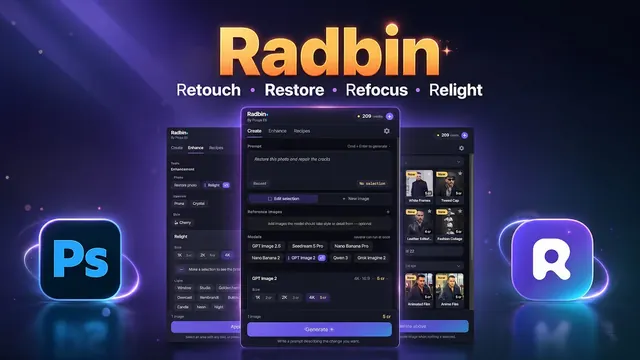
 Radbin
The short answer: write to Claude the way you'd brief a retoucher. Say what the photo is, what it's for, what to keep, and the result you want. No special words: my Christmas prompt had typos and it still understood. Then use your second message to point at what's wrong.
Full disclosure: I make Radbin, the plugin that connects Claude to Photoshop. Every result below is a real job from my video, made by Claude Opus 5.5 in Photoshop 2027 through Radbin, and I show where it went wrong too.
Want the prompts as a PDF? Every prompt from my video, 10 follow-ups, 20 more Photoshop jobs and 12 tips, in a free 12-page guide. Send me the PDF.
The three jobs at a glance
| Job | Prompts | Time | Credits | Layers |
|---|---|---|---|---|
| An empty office, furnished for day and evening | 1 | 5 minutes | 14 | 8 |
| A phone photo into a Christmas poster | 1 | About 9 minutes | 15 | 17 |
| A low-res portrait into a magazine cover | 3 | About 14 minutes | 18 | 32 |
Credits are Radbin's: a free account starts with 40, and on the Starter plan each of these jobs comes to about 70 to 90 cents. Claude worked in layers, so every step can be switched off or changed.
1. An empty office, furnished for day and evening
A phone photo of an empty 40 m² office. I wanted pictures for a sales page: furnished, modern and alive, in day and evening light.
I want you to use Radbin to edit an empty interior image opened in Photoshop, which is a 40 square meter office, I want you to use ai and your knowledge to decorate this office in a good style that at least 4-5 people can work here, I want the design to be modern and feel alive, good for day and night time. Make it like a professional interior image for a sales page with high resolution.
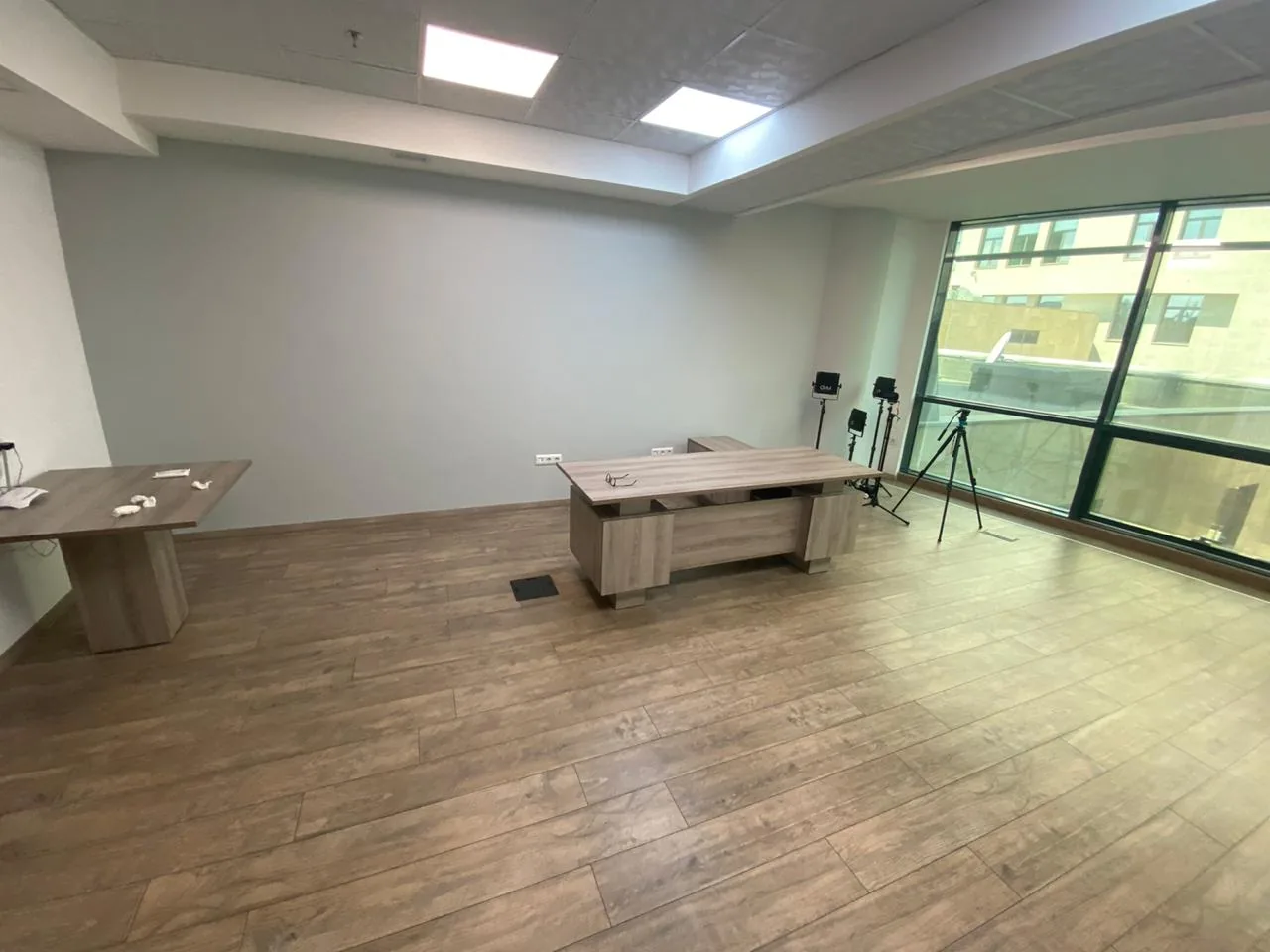
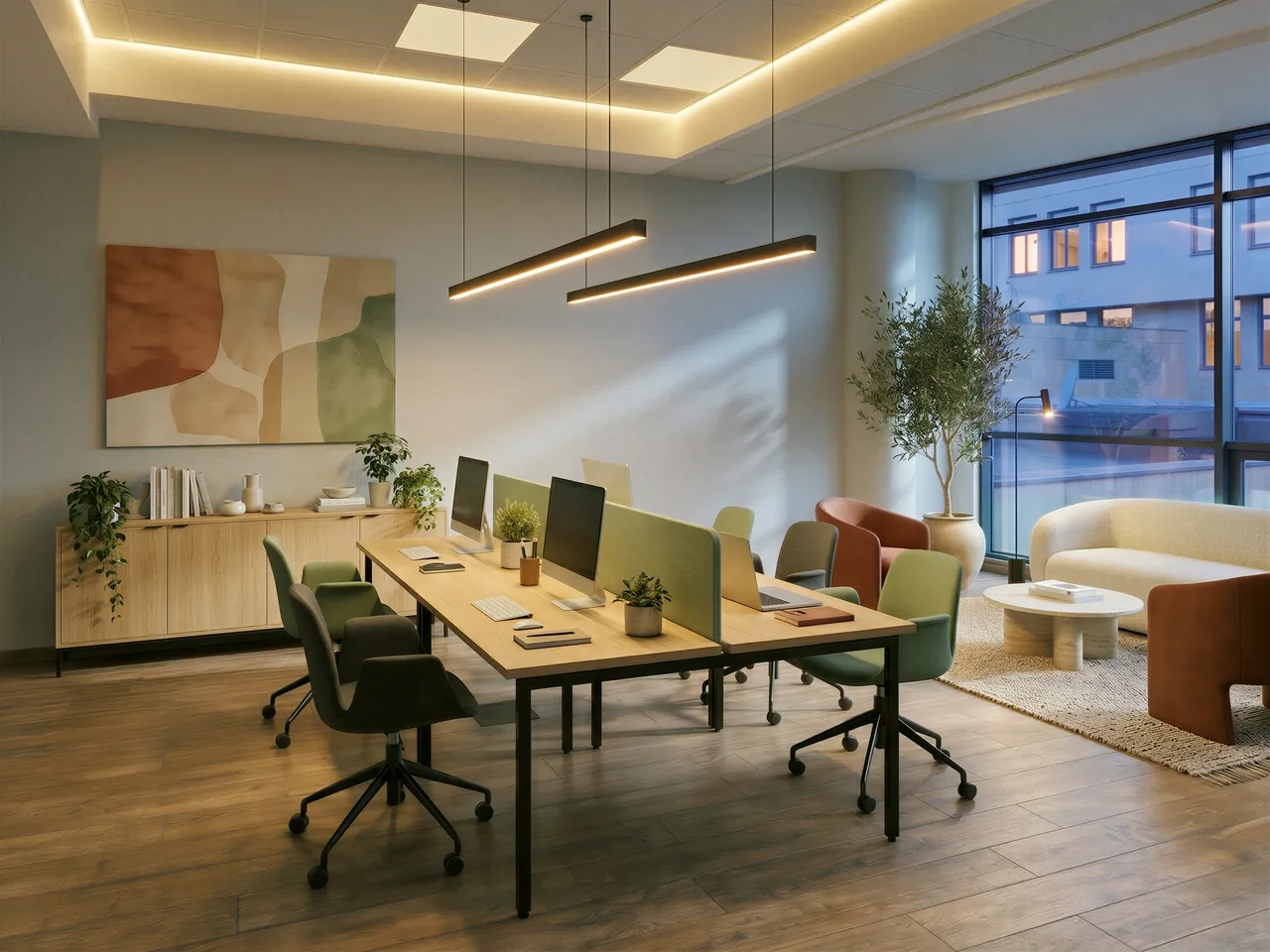 The photoBy Claude
Drag the handle. The evening version, one of the two Claude made.
Why it works:
- The size and the people. “40 square meter” and “4-5 people” set the scale, so the desks fit the room.
- A style in plain words. “Modern and feel alive” was enough. Claude chose the furniture, the plants and the light.
- Two lights in one prompt. “Day and night time” gave two versions, each in its own group of layers.
- What it's for. “For a sales page with high resolution” set the look and the final size.
What it took: 5 minutes, 14 credits and 8 layers. Selling or renting a property? Staged rooms are AI-made, so label them as virtually staged, as many listing sites require.
2. A phone photo into a Christmas poster
A blurry phone photo of the street I used to live on, on a foggy, snowy morning, with wires across it. I asked for a professional poster in two versions.
in my photoshop use Radbin to edit this image IMG_4236.HEIC , I want it to look like a professional photo poster, add more snow to the ground, remove the wires and add a good title like Gift Radbin for Christmas. then also make it high resolution and make 2 version of morning with cloudy light and evening with christmas feeling and christmas lighting and decorations.
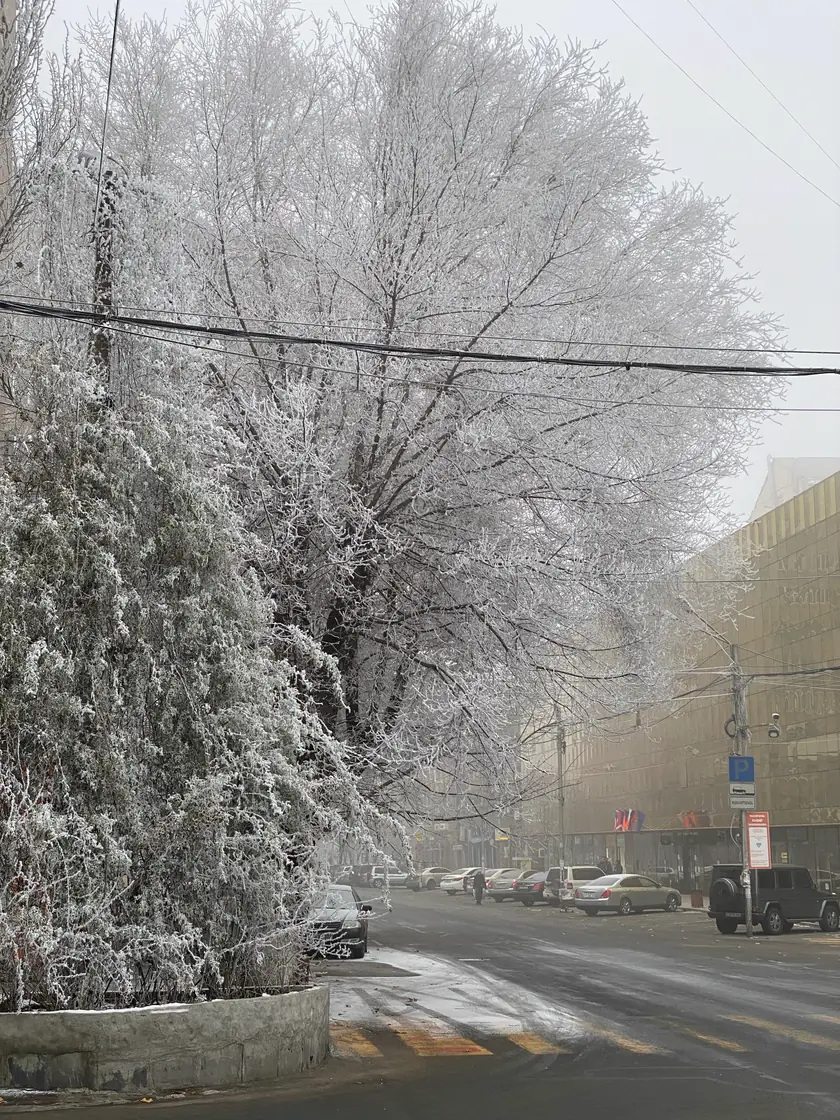
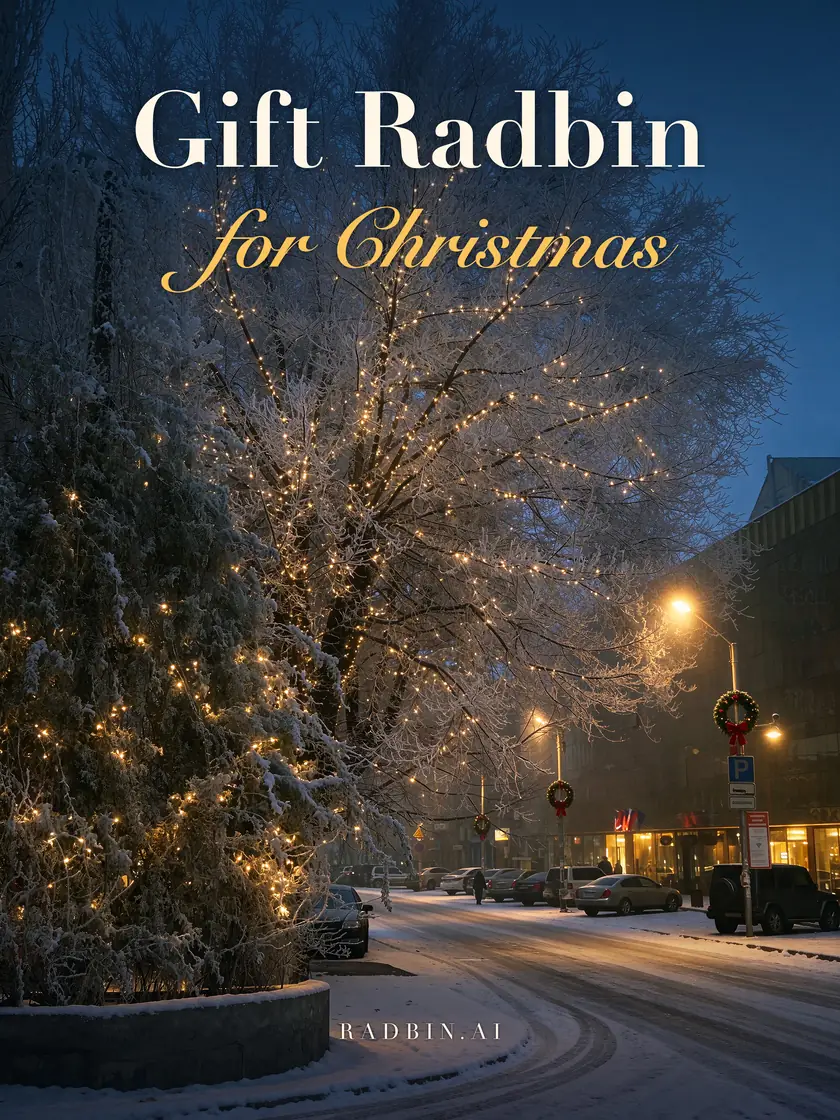 The photoBy Claude
Drag the handle. The evening version. For this post I took a painted slogan off the planter in the before.
Why it works:
- It names the photo, so Claude works on the right document.
- A list of jobs, in order: snow, wires, title, size, two versions. Claude turned it into a plan.
- An example title gave it the words and left the type design to Claude.
What it took: about 9 minutes, 15 credits and 17 layers. It added the snow and removed the wires, missed part of one and went back for it on its own, then built the evening: lights in the trees, wreaths, warm street lamps and the title.
3. A low-res portrait into a magazine cover
A small portrait with blemishes and redness. I wanted a natural retouch, the makeup from a reference photo, a bigger file, and then a magazine cover. It took three prompts, plus one note sent while Claude worked.
Prompt 1, with a reference photo of the makeup attached:
Edit the photo "retouch" inside photoshop using Radbin like a professional retoucher. Keep it natural, fix and improve the skin, remove blemishes and redness, and then add makeup similar to the attached image for her eyes, face skin, lips and so on. then also upscale it to have high resolution result.
The note I sent while it worked: Make sure the lip color is correct.
Prompt 2:
edit the image lighting and colors and lut and make it like a fashion magazine with title and some text, you can also modify the crop as you see fit. make it a professional magazine cover. Also you can modify the lighting or colors like background color if you think it would be better.
Prompt 3, after I spotted a problem:
the background has some circular lines we can see, fix that and what would you do if you want to make this cover magazine much better and professional? do it
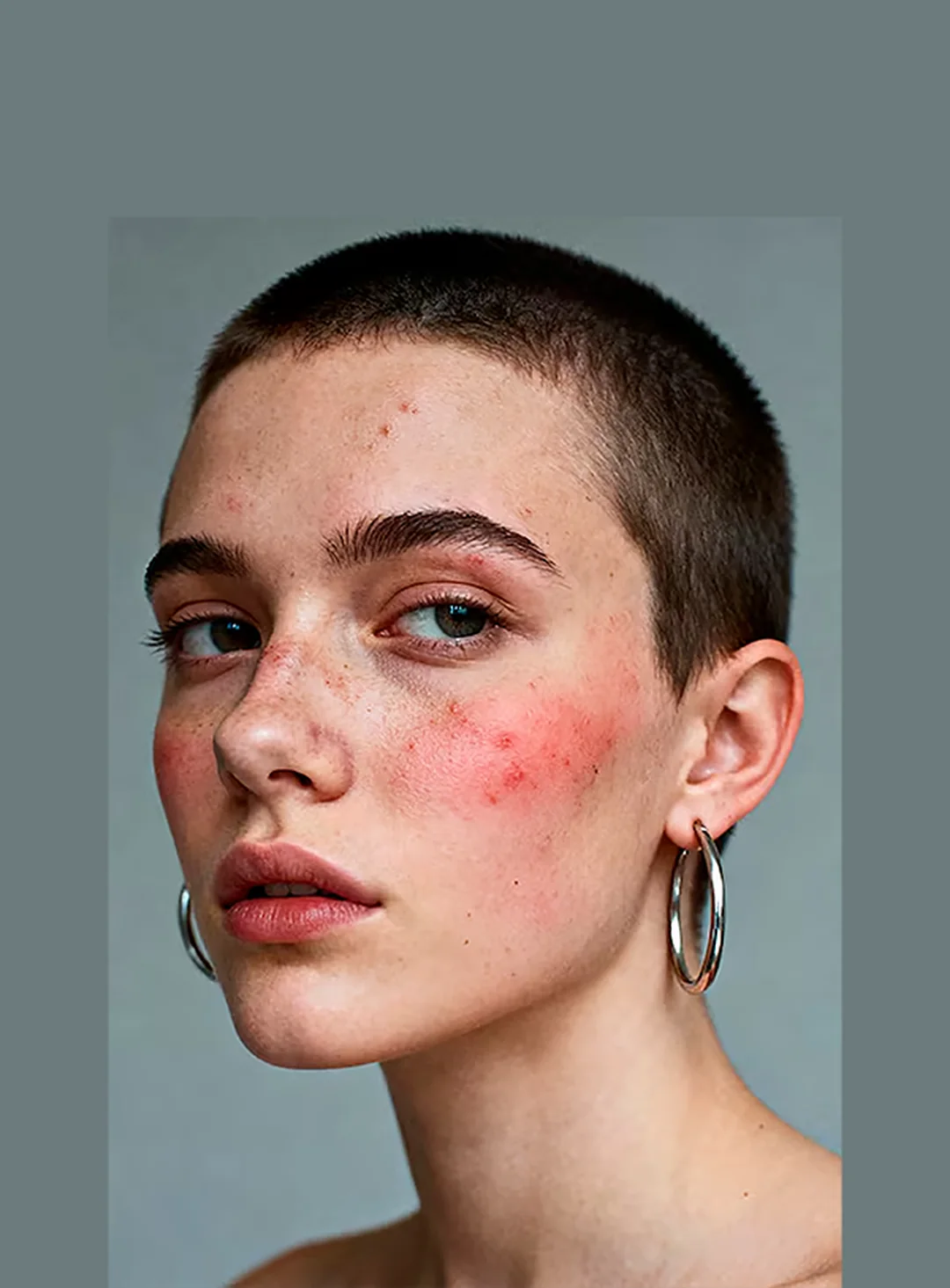
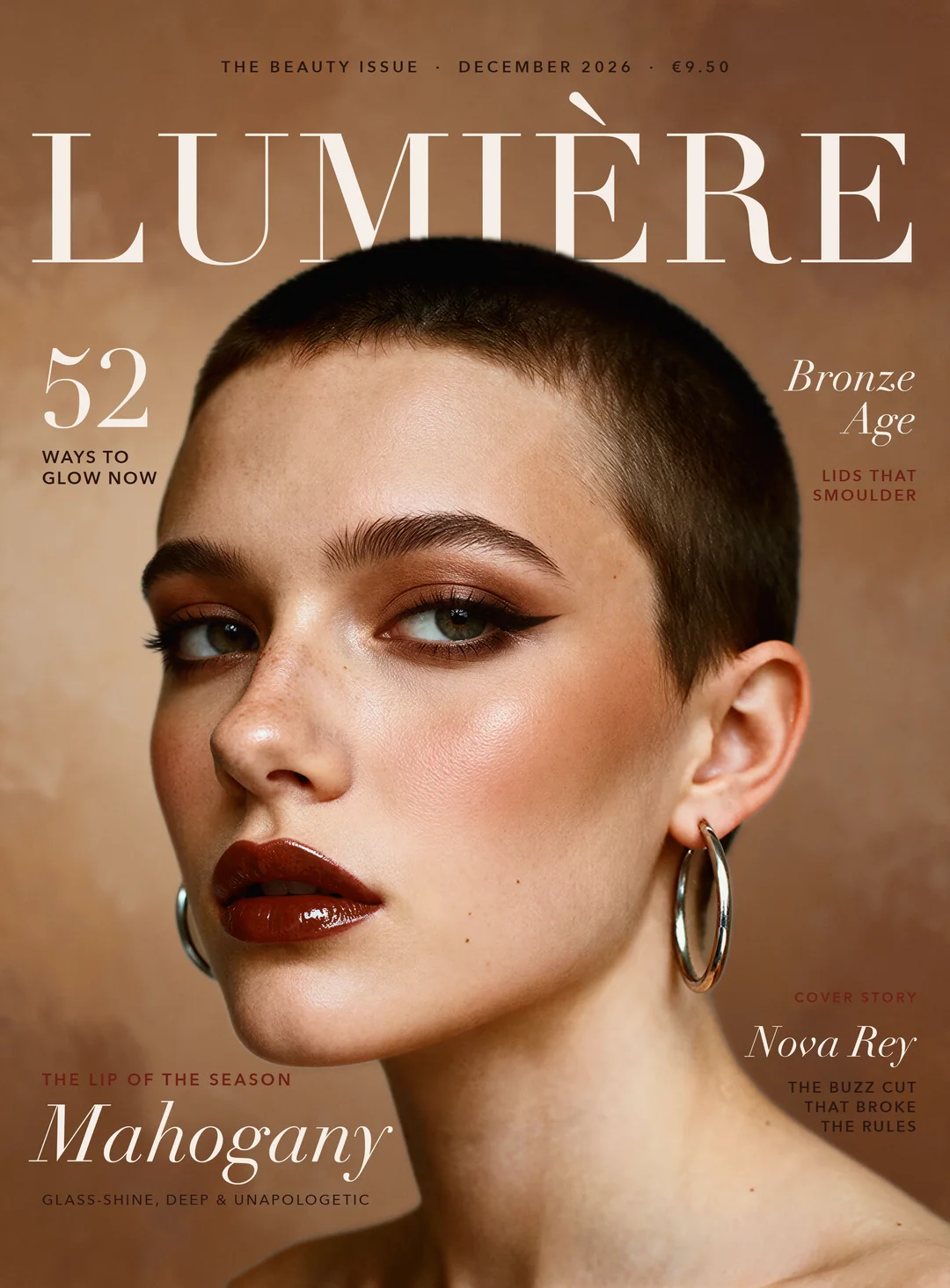 The photoBy Claude
Drag the handle. The starting portrait is an AI image, Designed by Magnific. The magazine and its cover lines are made up for this test.
Why it works:
- “Like a professional retoucher” sets the standard, and “Keep it natural” sets the limit.
- The order: skin first, then makeup, then upscale, so the finished look is what gets bigger.
- A reference beats a description. Attach a photo of the look you want.
- Permission to decide. “As you see fit” and “if you think it would be better” let Claude crop, extend the canvas and change the background.
- Name what's wrong, then ask for its judgement. “The background has some circular lines” says what and where; “what would you do… do it” let it keep improving the cover its own way.
What it took: about 14 minutes over three prompts, 18 credits and 32 layers. Where it messed up: after the type went on, the background picked up circular lines, and Claude didn't catch them itself. One message fixed them. Zoom to 100% before you call any job done.
The second message does the most
Your first prompt gets a strong draft; the next messages make it yours. Claude sees the document after every step, so a short note is enough: say what and where, not how. Five I use all the time:
- What would you do to make this better? Tell me in a few lines, then do it. It plans like an editor, then does it.
- The [wire at the top left] is still there. Remove it. Point at it the way you'd tell a person.
- Make the [skin smoothing] about half as strong. Keep the texture. Too much? Ask for a number.
- Make a second version for [evening], in its own group. Your first version stays as it is.
- Undo your last step and try another way. Every step is in Photoshop's History.
The other five follow-ups, 20 jobs and 12 tips are in the free PDF.
8 more prompts to try
Change the parts in [brackets] to fit your photo. Free means Photoshop's own tools; credits means one of Radbin's AI models, and Claude says the price before it starts.
| Job | Prompt | Cost |
|---|---|---|
| Develop a raw portrait | Develop this raw like a portrait retoucher. Keep it natural: fix the white balance, bring back the [blown-out window], calm the [red from the lamp] and soften the under-eyes. | Free |
| Skin, the real way | Retouch the skin like a high-end beauty retoucher. Keep pores, freckles and moles; remove only spots and redness. Check it at 100% on the cheek. | Free or credits |
| A listing photo | Edit this room for a property listing: straight verticals, the windows balanced with the room, warm but true colours. Don't add anything that isn't there. | Free |
| Remove what's in the way | Remove the [people in the background] and the [sign on the left]. Keep everything else exactly as it is. | Credits |
| Sky and land | The sky is blown and the land is too dark. Keep the sky's colour and open up the land with luminosity masks, not a filter. | Free |
| An ad scene | Put this [bottle] on a [marble table] in [morning light] for an ad. Keep the label exactly as it is. | Credits |
| Restore an old photo | Restore this old photo: fix the scratches, tears and fading, keep their faces as they are, and stay true to the original. | Free or credits |
| A YouTube thumbnail | Make a YouTube thumbnail from this photo of me with the title “[I tried it]”: my face big, bold readable text, and save a 1280×720 JPG under 2 MB. | Free or credits |
Want a job to stay free? Add Use only Photoshop's own tools, no AI models. Claude then works with adjustment layers, masks, Camera Raw, Radbin's skin retouch and type, which are all free.
6 habits that make it work
- Say what it's for. A listing, a cover, a 1280×720 thumbnail: the use decides the crop, the size and the look.
- Say what to keep. Freckles, moles, the label, her face, the windows. Claude protects what you name.
- Show, don't describe. Attach a reference for any look you can show: makeup, colour, a poster you like.
- Ask for versions in one go. Day and evening, morning and evening. Each lands in its own group.
- Zoom to 100% before you say done. Skin, edges and type are where mistakes hide.
- New photo, new chat. A long chat gets slow and loses focus. Start fresh for each job.
Not connected yet? Here's how to connect Claude to Photoshop, free, in seven steps.
Want the prompts as a PDF? Every prompt from my video, 10 follow-ups, 20 more Photoshop jobs and 12 tips, in a free 12-page guide. Send me the PDF.
More on AI apps in Photoshop
- Photoshop MCP servers, compared
- How to connect Claude to Photoshop
- How to connect ChatGPT to Photoshop
- How to connect Gemini to Photoshop
- Claude Code and Photoshop: batch edits
- Photoshop MCP: the setup for every app, and the 35 tools
Connect your AI app to Photoshop, free
Radbin gives Claude, ChatGPT and other AI apps Photoshop's own tools and a playbook of how a professional edits. Connecting is free, and a free account adds 40 credits for Radbin's AI models.
Watch Radbin on YouTube
Real tests and tutorials, inside Photoshop and Premiere. See the whole channel.
 21:44Photoshop 2027 new features vs Radbin
 19:57Claude Opus 5.5 edits my video in Premiere Pro
 16:20GPT Image 2.6 in Photoshop: images, vectors and GIFs
 7:37Upscale a low res portrait to 4K in Photoshop
 19:25Relight any photo in Photoshop with AI
 20:03Nano Banana 2.1 vs GPT Image 2 and FLUX 3: ten tests
 14:31Photoshop Relight vs Radbin Lightsmith
 10:24Retouch skin without losing the texture
 9:28Every Radbin tool in 9 minutes
 9:50Fix the focus of any photo after it was taken
 1:43Radbin changes only what you ask