 Radbin
The short answer: pick moments that stand on their own (one tip, one result, one story with its ending), put each in a 9:16 sequence, keep the speaker in frame, add captions and export. In Premiere you can do it by hand, let Auto Reframe follow the speaker for you, or let AI find the moments too: web clip makers like OpusClip, or a plugin that works inside Premiere, like Radbin for Premiere, which I make.
Finding and making a Short in my Premiere video, from 16:20.
How long should a Short be?
Many pages still say 60 seconds. That changed: a square or vertical video of up to 3 minutes now uploads as a YouTube Short, Instagram Reels go up to 3 minutes too, and TikTok takes uploads of 10 minutes. The limit isn't the problem. Attention is.
The best clips are one complete thought, told fast. The finder in my plugin aims for 15 to 60 seconds, and most of its best picks land between 25 and 45. A Short that needs a minute of setup belongs in the long video.
How do you pick moments that work as Shorts?
YouTube's own advice to creators is to "extract single, actionable steps that can stand alone as a Short", to "start with a question, a surprising fact, or a visually captivating moment", and to "get to the point quickly" (YouTube's blog). In a talking-head video, these are the moments that usually work:
- A single tip, from the problem to the fix.
- A result: a before and after, a number, a surprise.
- A strong opinion, with its reason.
- A story, but only with its ending.
- A mistake and how you fixed it.
The fastest way to find them by hand is to read, not watch: open the Text panel, transcribe the sequence, and skim the transcript for lines that would make a stranger stop scrolling. Each of those is a possible first line.
How do you make a vertical Short in Premiere by hand?
- Create a new sequence and set its frame size to 1080 × 1920 in Sequence Settings.
- Copy the clips of your moment into it, and cut it tight: start on the hook line, end on the payoff.
- Select each clip and, in Effect Controls, raise Scale and move Position until the speaker fills the frame. Keyframe Position if they move.
- Add captions. Shorts are often watched without sound, so they matter more here than anywhere: see how to add animated captions in Premiere Pro.
By hand you control everything, and with two or three Shorts a video it's fine. With ten, the reframing is the slow part, which is what Auto Reframe is for.
How does Auto Reframe work, and where does it go wrong?
- Select your sequence in the Project panel and choose Sequence › Auto Reframe Sequence.
- Set Target Aspect Ratio to Vertical 9:16.
- Set Motion Tracking. Adobe recommends Slower for very little or no camera motion, which suits most talking heads; Faster adds many more keyframes.
- Click Create. Premiere follows the motion, keeps your subject in frame, and puts the new sequence in an Auto Reframe Sequences bin. Fix any frame it got wrong in Effect Controls.
Three things catch people out:
- The frame size. From a 1080p sequence it keeps the 1080 pixel height, so you get a frame about 607 pixels wide. Set 1080 × 1920 in Sequence Settings.
- Nesting. Its clip nesting option keeps complex keyframes and speed changes, but Adobe notes that it doesn't keep soft transitions.
- It frames motion, not meaning. It follows whatever moves, and it doesn't choose the moments. Premiere 27.0, released at Adobe MAX, added no Shorts finder either.
Which AI clip maker should you use?
| Tool | Finds the moments | Editable in Premiere | Price |
|---|---|---|---|
| Premiere by hand, Auto Reframe | You do | Yes | In your plan |
| YouTube's Edit into a Short | You pick up to 60 seconds | No | Free |
| OpusClip | Yes | Pro and Business export to Premiere | Free with a watermark, $15 or $29 a month |
| Descript | Yes | Creator and Business export a timeline | From $16 a month, yearly |
| Klap | Yes | Not listed | From $29 a month |
| Riverside | Yes, Magic Clips | Not listed | Pro $29 a month |
| Radbin for Premiere (mine) | Yes, up to eight a video | Yes, a new sequence for each Short | 1 credit a minute, after the reading |
Prices are from each tool's own pricing page on 17 November 2026. The big difference isn't the AI, it's what you get back: most web clip makers give you finished files, and you upload your whole video to get them. If you want to keep editing in Premiere, check that the plan you pick exports a timeline.
How do you find and make Shorts inside Premiere with Radbin?
In Radbin for Premiere, Claude reads the same transcript it used for the edit and picks the Shorts. Your video never leaves your computer. Watch (16:20)
- After an edit, press Find shorts. Claude suggests up to eight moments, strongest first, each with its hook, why it works and its length.
- Press Play to hear a moment in the Source Monitor.
- Press Make the short. It builds a new 9:16 sequence named after the video, Short 1, with the edit's cuts inside it, the speaker's head followed, and a marker holding a suggested opening title. Your original stays untouched.
- Open it in the Studio to change the look or your position, then press Update the edit. Watch (17:38)
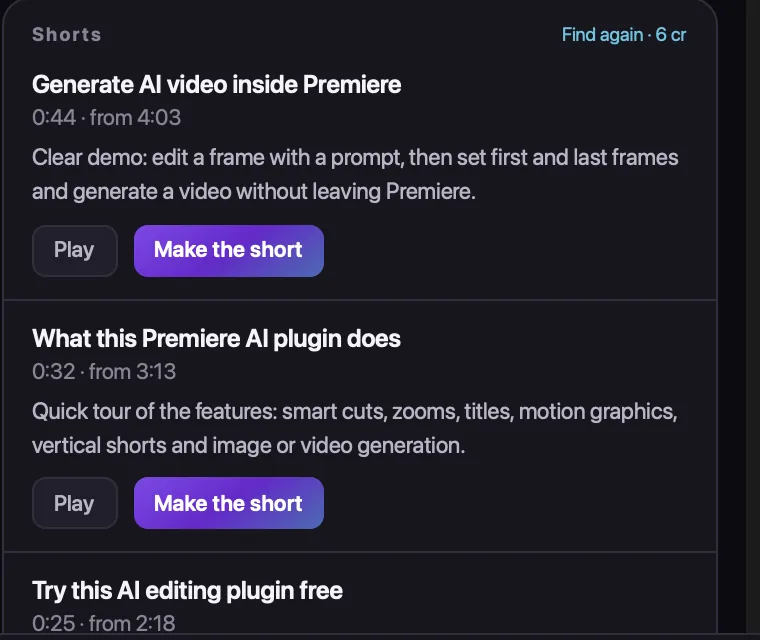
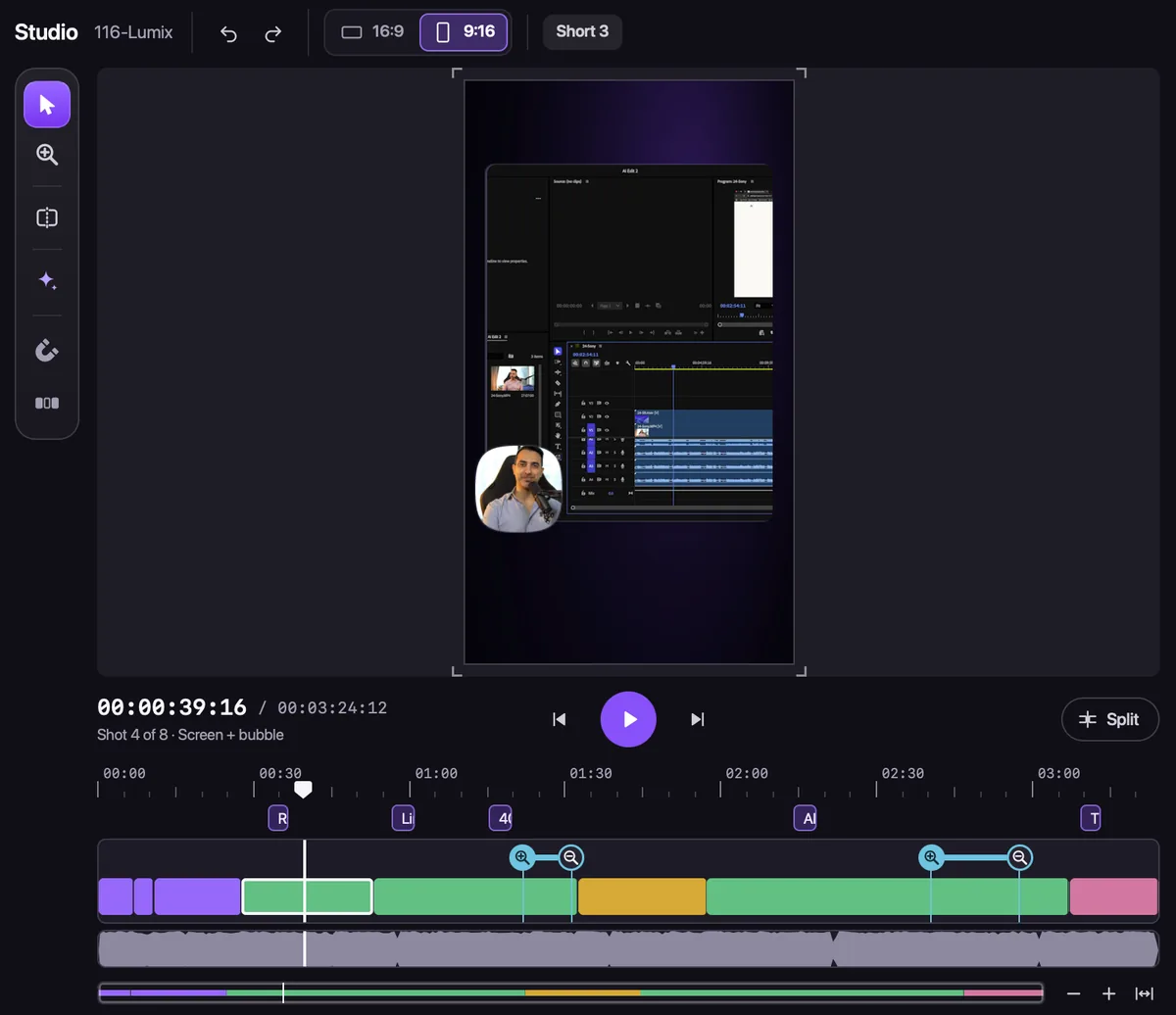
On my video it suggested three, and the one I made was 24 seconds long. "You don't need to do all the hard works yourself, you just give the orders," as I said in the video. One press on Vertical also turns the whole edit 9:16, if you want the full video for Reels or TikTok. Watch (18:11)
Cost: finding Shorts is 1 credit a minute, at least 2, and making one is free. It works from the edit's reading of your video, so from a raw recording the sound and the shot plan come first: about 30 credits in all for a 10-minute video, inside the free start of 40. The rest of what it does: how Claude edits video inside Premiere.
Captions and export
Add captions before you export, and keep them clear of the buttons at the bottom and the right of the phone screen. Then File › Export › Media, H.264, at the sequence's 1080 × 1920, with a high bitrate. Upload Shorts as they are; YouTube treats any square or vertical video up to 3 minutes as a Short.
Find the Shorts in your next video, inside Premiere Pro
Radbin for Premiere reads your video, suggests the moments that stand on their own, and makes each a vertical edit in its own sequence. Your first 40 credits are free.
Watch Radbin on YouTube
Real tests and tutorials, inside Photoshop and Premiere. See the whole channel.
 21:44Photoshop 2027 new features vs Radbin
 16:20GPT Image 2.6 in Photoshop: images, vectors and GIFs
 7:37Upscale a low res portrait to 4K in Photoshop
 19:25Relight any photo in Photoshop with AI
 20:03Nano Banana 2.1 vs GPT Image 2 and FLUX 3: ten tests
 14:31Photoshop Relight vs Radbin Lightsmith
 10:24Retouch skin without losing the texture
 9:28Every Radbin tool in 9 minutes
 9:50Fix the focus of any photo after it was taken
 1:43Radbin changes only what you ask