 Radbin
The short answer: Premiere captions your video by itself. Transcribe the sequence in the Text panel, then choose Create captions from transcript. Since version 26.3, in June 2026, it can also make single-word captions, one word at a time in sync with your voice. What it can't do yet is the look you see on most Shorts: a full line on screen with the spoken word lit up. For that you need a template, a plugin or another app.
One of the plugins below is mine, Radbin for Premiere, and I say so where it appears. A note on the name: Adobe renamed Premiere Pro to Adobe Premiere in January 2026, but most people still search for Premiere Pro, so I use both.
How do you add auto captions in Premiere?
- Choose Window › Workspaces › Captions and Graphics.
- In the Text panel, click Transcribe sequence and pick the language.
- In the panel's Captions tab, click Create captions from transcript. Choose the preset, the format, the longest line and how many lines, and click Create.
- Fix any wrong word in the Text panel, and change the look in the Properties panel. Save a look you like as a caption template.
Adobe lists 18 languages for captions and transcripts, among them English, Spanish, German, French, Japanese, Korean, Chinese, Hindi and Russian, and with the language packs installed it all works offline (Adobe's speech to text page).
How do you add subtitles from an SRT file?
If you already have subtitles, from a client or another tool, choose File › Import, pick the .srt file, and drag it onto your sequence. Premiere puts it on a caption track, and you style it like any other captions.
Can Premiere make word-by-word captions like TikTok?
Partly. Since 26.3, the Create captions dialog has a Single Word layout: "Simply choose Single Word when creating captions, and Premiere automatically synchronizes each word to your audio," as Adobe put it.
That gives you one word on screen at a time. It isn't the look most people mean, which is a whole line on screen with the word being spoken lit in another colour, like a karaoke screen. Premiere doesn't have that yet; there's an open feature request for it. You can build it by hand by converting your captions to graphics and animating each word, but on a ten-minute video that's an afternoon.
How do you get the highlighted-word look?
Three ways: a caption template (a motion graphics template you apply word by word), a plugin that builds the captions inside Premiere, or a web app that renders a new video with them burned in. The plugins and apps do the timing for you, which is the slow part.
Which caption tool should you use?
| Tool | Runs | Spoken word lit in a line | Subtitle file | Price |
|---|---|---|---|---|
| Premiere's own captions | Built in | No, single words since 26.3 | SRT and more | In your plan |
| AutoCut | Panel in Premiere | Not stated | Not checked | AI plan, $14.90 a month yearly |
| FireCut | Panel in Premiere | Yes, on Pro and Max | Not checked | Pro $34 a month, or $20 yearly |
| Submagic | Web app, renders a new video | Yes | Not stated | From $19 a month, or $12 yearly |
| Radbin for Premiere (mine) | Panel in Premiere | Yes, in four of its six looks | SRT and WebVTT | 1 credit a minute, at least 4 |
Prices are from each tool's own pricing page on 17 November 2026. The question to ask first: do you want to stay in Premiere, or are you happy to upload and get a finished file back?
How do you translate captions in Premiere?
In the Text panel's Captions tab, choose Translate captions and pick the language. Premiere makes a new caption track in that language, using a cloud translation service, and Adobe lists 27 languages to translate into. Read them before you publish: names and slang are where machine translation slips.
Should you burn captions in or export an SRT?
In File › Export, the Captions section offers four choices: none, Create Sidecar File (an SRT among other formats), Burn Captions Into Video, and embedding them in formats that allow it.
- Burn in styled captions for Shorts, Reels and TikTok, where most people watch with the sound off and the look is part of the video.
- Upload an SRT to YouTube for long videos, so viewers can switch captions on and off and YouTube can read them.
- Both is fine. And if captions burn in when you didn't ask for it, check the export preview and hide the caption track before exporting.
Where should captions sit on Shorts and Reels?
Keep them out of the areas the apps cover with buttons and text. Meta's guide for Reels says to leave about 14% at the top, 35% at the bottom and 6% at each side free (Meta's Reels guide). On a 1080 × 1920 video that's about 269 pixels at the top, 672 at the bottom and 65 at the sides.
Keep each page short, three to five words on a vertical video, and make the text big enough to read at arm's length. For long videos, the classic subtitle rule is at most two lines of about 42 characters each.
What if Premiere can't caption your language?
Premiere's speech to text doesn't list Persian or Arabic, for example. You can import an SRT made elsewhere, or use a tool that hears your language and handles right-to-left text. I make videos in Persian too, so my Captions tab was tested in English and Persian: Persian is joined correctly and reads right to left, with English words inside it left to right.
How does Radbin's Captions tab work?
It's one button. Radbin for Premiere hears your sequence, draws the captions with the spoken word lit, and places them on their own track above your edit as one clip; one Undo removes them. It also saves an SRT file, and WebVTT if you want it.
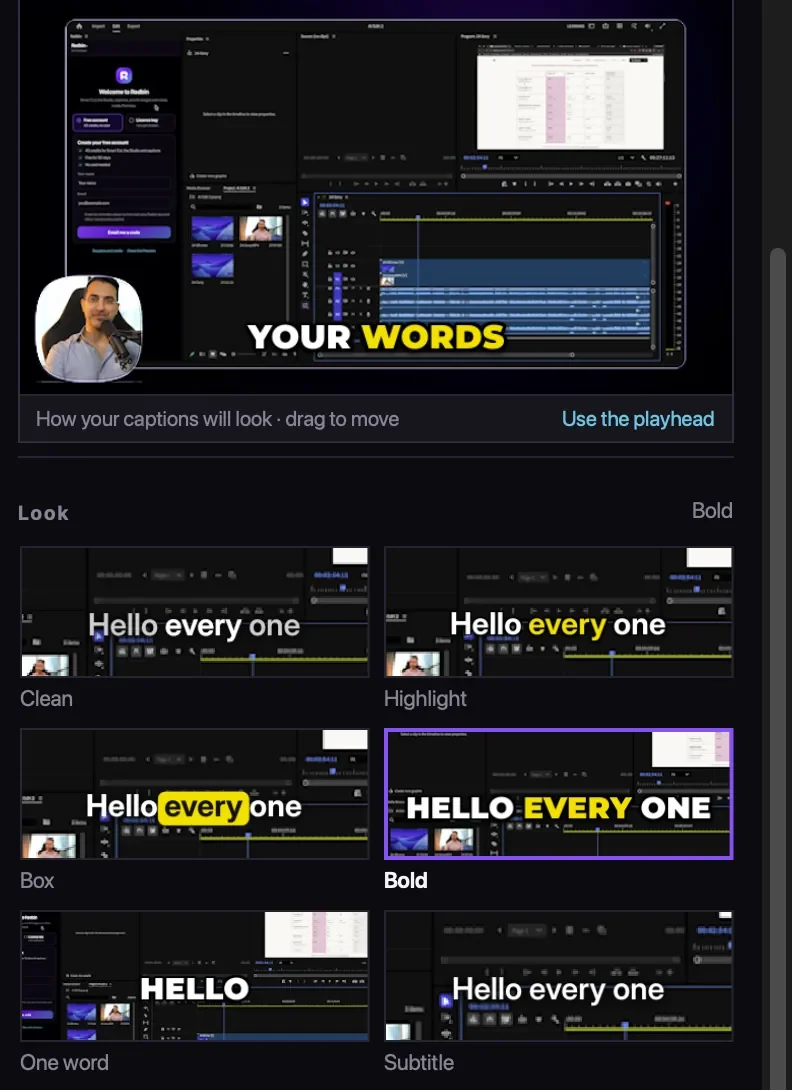
- Six looks: Clean, up to 8 words with the spoken word in white; Highlight, up to 6 words with the spoken word in your colour; Box, a box in your colour that moves from word to word; Bold, up to 3 words in capitals; One word, large in the middle; and Subtitle, two plain lines.
- Your settings: size, place (top, middle, lower third or bottom, or drag it in the preview), one of six colours, and a cut or a fade between pages.
- Vertical video: the places stay clear of what Shorts, Reels and TikTok draw over the video, and the pages get shorter.
- Fixing words: press a word to type over it, fix the same mistake everywhere at once, add or take out a word, or start a new page. Hesitations like um start out taken out. Updating only redraws what changed.
Cost: 1 credit a minute, at least 4. Only the hearing costs; the looks and your corrections are free. Two honest limits: the captions are drawn pictures, not Premiere text, so you fix words in the panel; and if you cut the video again afterwards, it has to hear the new cut. Add captions once the edit is final.
The other things it does, from cutting retakes to finding Shorts: how Claude edits video inside Premiere.
Animated captions in one click, inside Premiere Pro
Radbin for Premiere draws word-by-word captions in six looks on their own track, in English, Persian and more, with an SRT file for YouTube.
Watch Radbin on YouTube
Real tests and tutorials, inside Photoshop and Premiere. See the whole channel.
 21:44Photoshop 2027 new features vs Radbin
 19:57Claude Opus 5.5 edits my video in Premiere Pro
 16:20GPT Image 2.6 in Photoshop: images, vectors and GIFs
 7:37Upscale a low res portrait to 4K in Photoshop
 19:25Relight any photo in Photoshop with AI
 20:03Nano Banana 2.1 vs GPT Image 2 and FLUX 3: ten tests
 14:31Photoshop Relight vs Radbin Lightsmith
 10:24Retouch skin without losing the texture
 9:28Every Radbin tool in 9 minutes
 9:50Fix the focus of any photo after it was taken
 1:43Radbin changes only what you ask