 Radbin
The short answer: select your camera clips and choose Clip › Create Multi-Camera Source Sequence, synced by Audio. Make a sequence from it, switch the Program Monitor to the Multi-Camera view, and press the number keys as it plays to change angles. Fix the cuts, clean the sound, and export at podcast loudness, about -16 LUFS. Premiere never switches cameras by itself; plugins such as AutoPod or Radbin for Premiere do that for you.
Full disclosure: I make Radbin for Premiere, and I say where it fits and where it doesn't. Adobe renamed Premiere Pro to Adobe Premiere in January 2026; I use both names.
My two-camera edit, from 3:07.
What do you need before you start?
- A camera on each person, or a wide shot plus close-ups, all recording their own sound, even if it's just the camera's microphone. Premiere syncs by that sound.
- One clean recording of the voices: a microphone per person is best, but one good recorder works.
- A clap at the start, in view of every camera. If sync by sound ever fails, it's your backup.
How do you sync multiple cameras in Premiere Pro?
- Select all the camera clips and the audio file in the Project panel.
- Choose Clip › Create Multi-Camera Source Sequence.
- Set Synchronize Point to Audio, choose how to name the cameras, and click OK. Premiere lines up the clips by their sound and makes a multicam source sequence.
If the sound sync fails, mark the clap: put a clip marker with the same name on the clap in every clip, and sync by Clip Marker instead.
How do you switch cameras in the multi-camera view?
- Right-click the multicam source sequence and choose New Sequence From Clip.
- In the Program Monitor, open the wrench menu and choose Multi-Camera. Every angle shows on the left.
- Play the sequence and press 1, 2 or 3 to cut to that camera as you go.
- Fix it afterwards: select a cut piece and click another angle to swap it, or move a cut with the Rolling Edit tool.
When you're done, right-click and flatten the multicam clips if you want plain clips for colour and effects.
When should you cut to the other person?
Professional podcast editors work to a few rules of thumb (Finchley's guide is a good read):
- Cut two to four frames after the new speaker starts, not on the exact frame, or it feels robotic.
- Hold every shot at least two to four seconds, so a quick "yes" doesn't trigger a cut.
- Reactions last two to three seconds. Wide shots last five to ten, for topic changes, pauses and people talking over each other.
- Let the sound lead the picture by six to twelve frames with J and L cuts. Less feels like a hard cut, more feels out of sync.
How do you clean podcast audio in Premiere 27.0?
- Enhance Audio, the updated Enhance Speech, cleans up voices recorded in a room.
- Separate Crosstalk, new in 27.0, splits overlapping speech into Speaker 1, Speaker 2 and background, for up to two speakers. It works on clips from 1 second to 10 minutes and uses 1 generative credit a second (Adobe).
- Auto Ducking lowers music under the voices, and in 27.0 its keyframes follow your edits.
- Loudness: Apple Podcasts asks for about -16 LKFS, within 1 dB, with the true peak below -1 dBFS.
Can Premiere switch cameras automatically?
No: in Premiere's own multicam, you pick every angle. These tools do it for you:
| Tool | Inside Premiere | How it switches | What it needs | Price |
|---|---|---|---|---|
| AutoPod | Yes | By who's speaking, up to 10 cameras | A separate audio track for each speaker | $29 a month |
| FireCut | Yes | Camera switching on Pro | Not stated | Pro $34 a month, or $20 yearly |
| Premiere Assistant (Cutback) | Yes | By faces and the conversation | Up to 3 cameras on Basic | Free Starter, Basic from $13 |
| Descript | No, exports a timeline | Automatic multicam | Its own editor | Creator from $24 a month, yearly |
| Radbin for Premiere (mine) | Yes, a new sequence | Claude plans every shot | One main sound; clips needn't be synced | 40 credits free, then from $9.97 |
Prices from each tool's own page on 17 November 2026.
How does Claude edit a two-camera video with Radbin?
Here's what I did in my video, with two cameras and a screen recording. Watch (3:52)
- Stack the clips on the timeline. "It doesn't need to be synced": Radbin lines each camera up with the main sound itself, drift included.
- Check who's who. "It will recognize the person in the scene": each person gets a letter, the same in every camera, and you pick your main camera and the clip with your main sound. Watch (4:33)
- Choose the pace. I picked Podcast, "because for podcasts it gives more space for the cuts and it feels a little bit more natural". It shortens long gaps and leaves a few ums in. Watch (6:08)
- Press the edit button. The result is a new sequence; your original stays as it was.
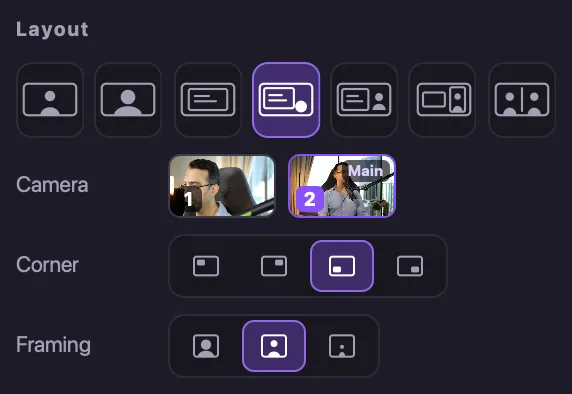
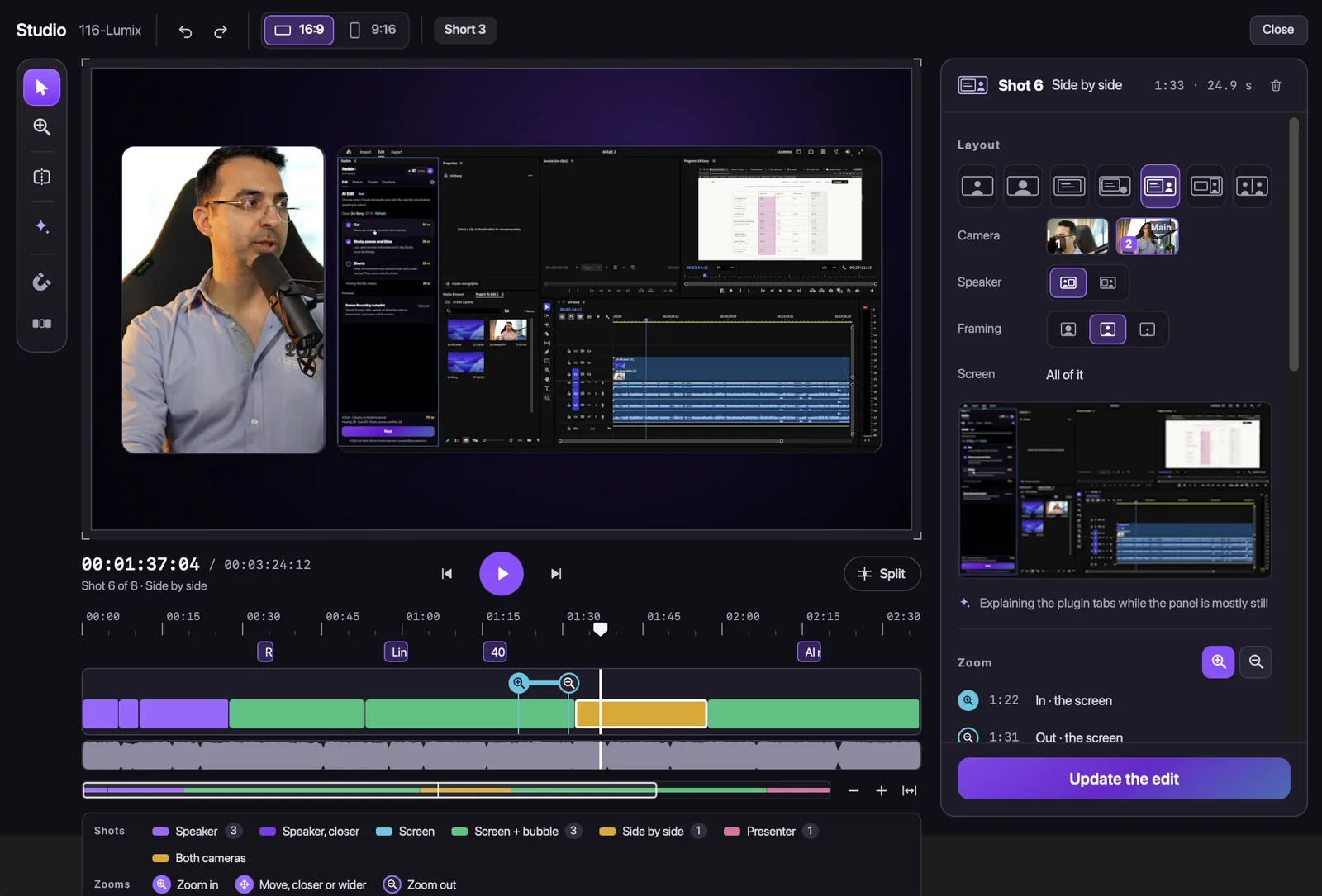
With one person and two cameras, it stays on your main camera and moves to the other one every few shots, and you can show both cameras side by side or switch any shot in the Studio: "Okay, split it," and the second half was on the other camera. Watch (8:49)
With two people, it tells the voices apart from the one main sound, matches them to the faces, asks you to confirm who's who once, and then follows whoever speaks, holding through short replies and never cutting a shot under two seconds. That two-person mode is the newest part, so watch its cuts the first time.
What it doesn't do yet: read a separate microphone track for each person, or choose the camera someone is looking into. A full edit costs about 4 credits a minute: how Claude edits video inside Premiere.
Which tool fits your setup?
- A mic for each person and many speakers: AutoPod is built for exactly that.
- One main recording, and you want the whole first edit, cuts, shots and titles: Radbin for Premiere.
- A small budget: Premiere Assistant's free Starter plan, or Premiere's own multicam by hand.
- You'd rather edit by text: Descript, then export to Premiere.
To cut the silences and retakes as well, see how to remove silence in Premiere Pro, and your retakes too.
Let Claude cut your next two-camera video
Radbin for Premiere lines up your cameras by sound, takes out the retakes and long pauses at a podcast pace, and lays out every shot in a new sequence. Your first 40 credits are free.
Watch Radbin on YouTube
Real tests and tutorials, inside Photoshop and Premiere. See the whole channel.
 21:44Photoshop 2027 new features vs Radbin
 16:20GPT Image 2.6 in Photoshop: images, vectors and GIFs
 7:37Upscale a low res portrait to 4K in Photoshop
 19:25Relight any photo in Photoshop with AI
 20:03Nano Banana 2.1 vs GPT Image 2 and FLUX 3: ten tests
 14:31Photoshop Relight vs Radbin Lightsmith
 10:24Retouch skin without losing the texture
 9:28Every Radbin tool in 9 minutes
 9:50Fix the focus of any photo after it was taken
 1:43Radbin changes only what you ask