 Radbin
The short answer: Premiere Pro has no one-click silence remover that works by volume, but its Text-Based Editing finds every pause in the transcript and deletes them all at once. That takes care of dead air. It does nothing about retakes, because a retake isn't silence: it's you saying the same sentence twice. For those you need a tool that understands what you said.
I record tutorials every week, so I've tried most of the ways below. One of them is mine: Radbin for Premiere, where Claude Opus 5.5 does the cutting. I'll say where each one stops.
My video on YouTube, 20 minutes: a two-camera edit, start to finish.
A note on the name: Adobe renamed Premiere Pro to Adobe Premiere with version 26.0, in January 2026. Almost everyone still searches for Premiere Pro, so I use both.
1. How do you delete pauses with Text-Based Editing?
- Open the Text panel and transcribe the sequence, if Premiere hasn't already.
- In the transcript, click the filter icon and choose Pauses. Every gap longer than the minimum is listed.
- Delete one, or all of them at once. Premiere ripple-deletes the clips, so no gaps are left behind.
Set the shortest pause it counts in Transcript View Options, under the three dots at the top right of the Text panel. Only the sequence's transcript can cut, not a source clip's.
2. How do you remove um and uh?
The same filter lists Filler words. Premiere has found "um" and "uh" since version 24.1, in December 2023, in the languages its speech to text supports. Delete them one by one or all together, and listen to a few first: some sit inside a breath you want to keep.
3. How do you cut silence by hand, fast?
- Add Edit cuts every selected track at the playhead: Cmd+K (Ctrl+K on Windows). Cmd+Shift+K (Ctrl+Shift+K) cuts all tracks.
- Cut at the start and at the end of a silence, select the piece, and choose Edit › Ripple Delete. The gap closes behind it.
- Q and W trim from the playhead back to the previous cut, or forward to the next one, in one key.
Follow the waveform and it's quick with practice, but on a 20-minute recording it's still the longest way.
Why doesn't removing silence remove your retakes?
Because a retake is speech. When I stumble, I stop, say something like "OK, let's do that again", and say the sentence a second time. A silence remover sees two loud passages and a short gap, so it keeps both takes and only closes the gap. You end up with the mistake and the fix back to back.
To cut a retake, a tool has to read the transcript, understand that two sentences are the same sentence, and pick the keeper. That's a language job, not an audio one.
Which tools remove silence and retakes?
| Tool | Silence | Retakes | Where it runs | Price |
|---|---|---|---|---|
| Text-Based Editing | Pauses | No | Built into Premiere | In your plan |
| AutoCut | Yes | AutoCut Repeat, on its AI plan | Premiere plugin | $79 a year; AI plan $178.80 |
| FireCut | Yes | Repetition removal, Pro and Max | Premiere plugin | From $19 a month |
| TimeBolt | Yes | Not listed | Desktop app, XML to Premiere | $17 a month, or $347 once |
| Recut | Yes | No | Desktop app, XML to Premiere | $149 once, or $19 a month |
| Descript | Word gaps | Remove Retakes | Its own editor, exports to Premiere | From $16 a month |
| Gling | Yes | Bad takes | Desktop app, XML to Premiere | 1 free hour a month, then from $20 |
| Radbin for Premiere | Long pauses | Yes, with Claude Opus 5.5 | Premiere plugin | 40 credits free, then from $9.97 a month |
Prices are from each tool's own pricing page on 17 November 2026, and they change often, so check before you buy. FireCut, Descript and Gling also remove filler words. Radbin is mine.
How do you remove retakes and pauses with AI, inside Premiere Pro?
This is what I built Radbin for Premiere to do. Claude Opus 5.5 reads the transcript, finds the retakes, the restarts and the long pauses, and cuts them in a new sequence. Your original sequence stays exactly as it was. Watch (3:07)
- Open Window › UXP Plugins › Radbin and go to the Edit tab.
- Put your clips on the timeline. With two cameras and a screen recording, stack them rather than placing them end to end: they don't have to be synced, and the price drops. Watch (3:52)
- Pick the main camera and the main audio, add any requests you have, and choose the pace. For my podcast-style video I picked a relaxed one that leaves more room around each cut.
- Press the edit button. The price is on it before you press: about 4 credits a minute for a full edit with shots, zooms and titles, 3 for cuts only.
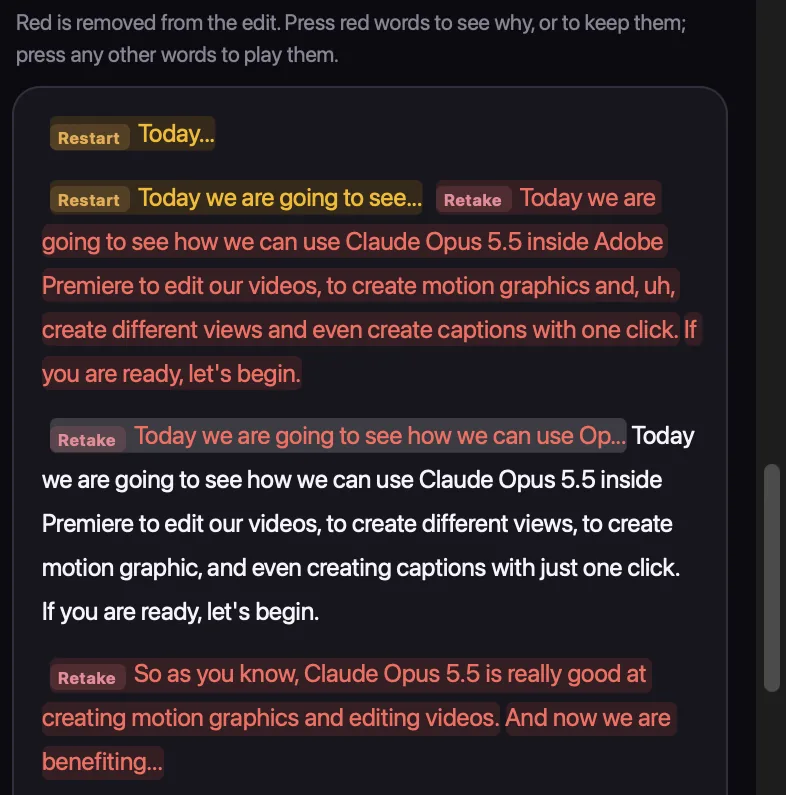
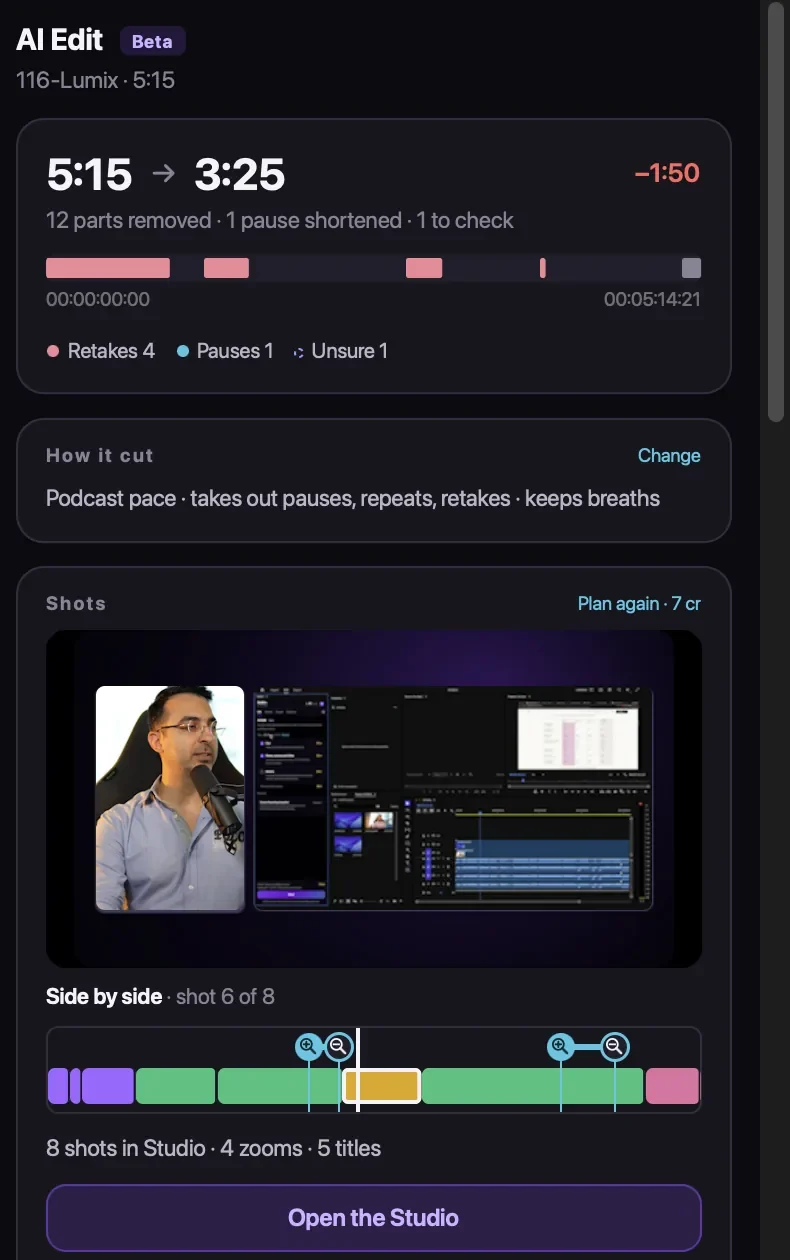
On my launch video, it took a 5:15 recording down to 3:25 in about a minute and a half: it removed 12 parts, the retakes, the restarts and a long pause, for 24 credits. While recording, I had even said "Claude, cut it from here" before a part I didn't want, and "till here" after it, and it did. Watch (13:04)
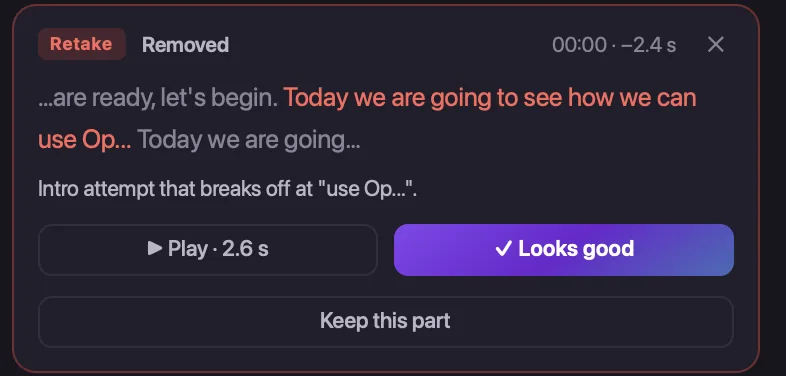
Every cut is listed with its reason, and one press brings any part back. If it's unsure about a cut, it asks you first. Changing the edit afterwards is free: the update took about five seconds. Watch (15:28)
Everything about it, with prices: Radbin for Premiere. Install steps: the Premiere guide.
How much pause should you keep?
Less than you think, more than none. Cut every silence to zero and a talk sounds breathless and jumpy; viewers need a beat after a point lands. For a fast tutorial, keep a short breath between sentences. For an interview or a podcast, leave more: the pauses are part of the conversation. Whatever tool you use, watch the first two minutes of the result at normal speed before you trust the rest.
Let Claude cut your next video, inside Premiere Pro
Radbin for Premiere takes out retakes, restarts and long pauses, lays out your camera and screen, and adds zooms and titles in a new sequence. Your first 40 credits are free.
Watch Radbin on YouTube
Real tests and tutorials, inside Photoshop and Premiere. See the whole channel.
 21:44Photoshop 2027 new features vs Radbin
 16:20GPT Image 2.6 in Photoshop: images, vectors and GIFs
 7:37Upscale a low res portrait to 4K in Photoshop
 19:25Relight any photo in Photoshop with AI
 20:03Nano Banana 2.1 vs GPT Image 2 and FLUX 3: ten tests
 14:31Photoshop Relight vs Radbin Lightsmith
 10:24Retouch skin without losing the texture
 9:28Every Radbin tool in 9 minutes
 9:50Fix the focus of any photo after it was taken
 1:43Radbin changes only what you ask