 Radbin
The short answer: Generative Extend adds up to 2 seconds to the start or end of a clip. Premiere 27.0's new Generative Media Tool generates a clip in a gap on your timeline from a prompt, with Firefly or a partner model. And models that take a first and a last frame can animate a still or bridge two of your own shots. They all spend credits. Use AI B-roll for ideas, moods and transitions, not as proof that something happened.
Full disclosure: one of the tools here, Radbin for Premiere, is mine. The model results I mention come from my own tests on YouTube.
The Create tab in my Premiere video, from 2:03.
What is AI B-roll, and when should you use it?
B-roll is the footage you cut away to while someone talks: a product, a place, a hand on a keyboard. AI B-roll helps when you can't film the shot: an idea, a mood, a metaphor, a stylised transition. It hurts when it acts as proof. A generated "result" in a product review, a real place that didn't look like that, or a real person who never did that will cost you trust, and on YouTube it may need a label.
How do you add B-roll in Premiere Pro by hand?
- Put the B-roll on a track above your main footage (V2), over the part it illustrates.
- For stock, open the Adobe Stock panel, place a watermarked preview to try it, then license it: Premiere swaps in the full-resolution clip and keeps your edits.
- Use J and L cuts so the sound leads or trails the picture: turn off Linked Selection and trim the audio and the video separately.
How far can Generative Extend stretch a clip?
Up to 2 seconds of video and 10 seconds of audio, added at the start or the end of a clip that's at least 2 seconds long. Take the Generative Extend tool and drag the clip's edge; the new frames are labelled as AI, and they carry Content Credentials. It works in 4K, landscape and vertical. It's a premium feature, so it spends generative credits by the second. Use it to hold a shot a beat longer for a transition, not to make new footage.
What does Premiere 27.0's Generative Media Tool do?
New in Premiere 27.0, released on 10 November 2026: drag the tool across a range of your timeline, type a prompt, pick a model, and set the resolution, the aspect ratio and the length. You can give it a first frame to start from, or a first and a last frame for a transition, and supported models add sound. The estimated credits show before you generate, and the results land as clips in a Generation history bin (Adobe's announcement). Adobe's partner models include Google Veo, Kling, Runway and Luma, and which ones you see depends on your region and plan.
How do you animate a still or bridge two shots with first and last frames?
Give a model two frames and it invents the motion between them. As Google's documentation for its Gemini Omni model puts it, "the model will animate the scene from the first frame to the ending frame". In practice:
- Bridge two shots: the last frame of one clip and the first frame of the next, and a sentence about the move between them.
- Animate a still: one frame, plus what happens next, for example "snow starts to fall gently as the camera drifts to the right".
- Keep the two frames alike in framing and light. The further apart they are, the stranger the middle.
Which AI video model makes the best B-roll?
When I tested Seedance 2.5 against MiniMax H3 on six real ads, all made from a picture at 720p, Seedance won four, Gemini Omni won one and MiniMax one. "Seedance 2.5 is really good at actions and action scenes," I said, while on MiniMax "you can feel the plastic style of the AI in it". My workflow since: "generate both, and then choose the best shots out of each of them and mix them together". You rarely need a whole AI clip, "maybe one or two or three shots of that video".
| Model | Good for | Longest clip | Top quality |
|---|---|---|---|
| Seedance 2.5 | Action and realistic products | 30 seconds | 1080p |
| Gemini Omni 1.1 | First to last frame, crisp detail | 10 seconds | 4K |
| MiniMax H3 | Cheap tries, with sound | 15 seconds | 2K |
| Wan 3 | Budget clips | 30 seconds | 1080p |
| Veo 3.1 | Cinematic shots | 8 seconds | 1080p |
| Kling 3.0 | Several shots, start and end frames | Not checked | 1080p |
Model specs change fast, and some of these come from third-party tests, so check the model's own page before a big job. One more lesson: OpenAI closed the Sora app in April 2026 and its API in September, so don't build your workflow around a single model.
How do you make AI B-roll in Premiere with Radbin?
Radbin for Premiere's Create tab works from your own frames, which is what makes AI B-roll match a talking-head video. "Let's say I want this as my first frame," as I did in the video: it grabs the frame at your playhead. Watch (2:38)
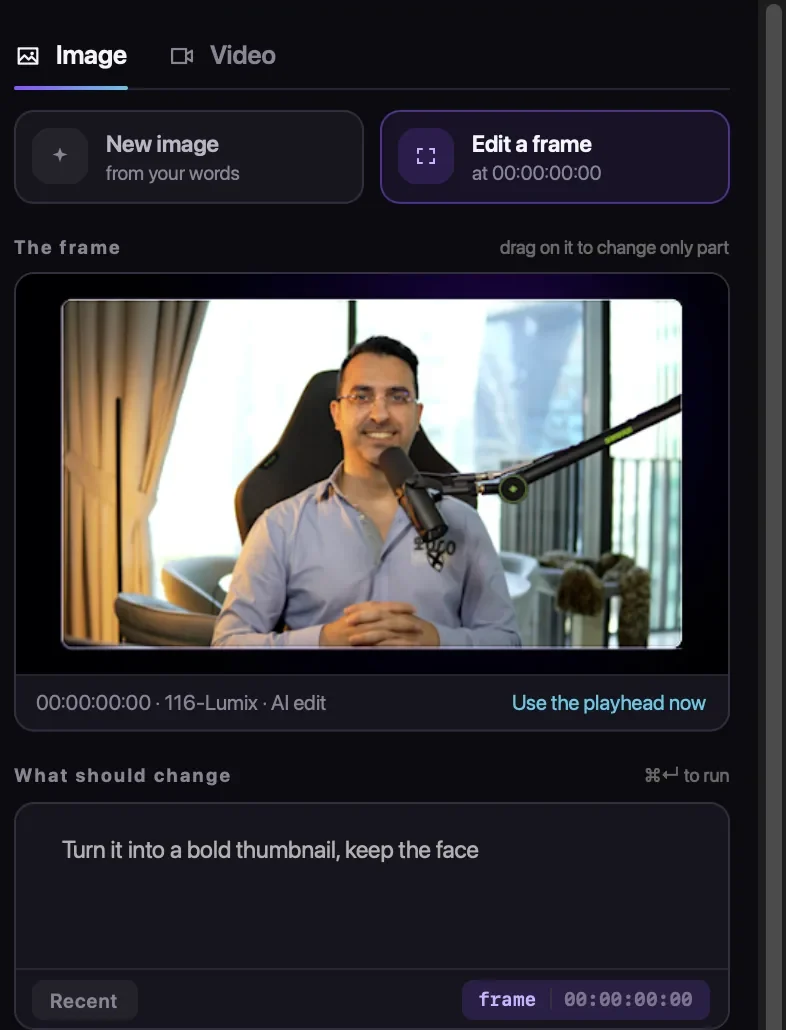
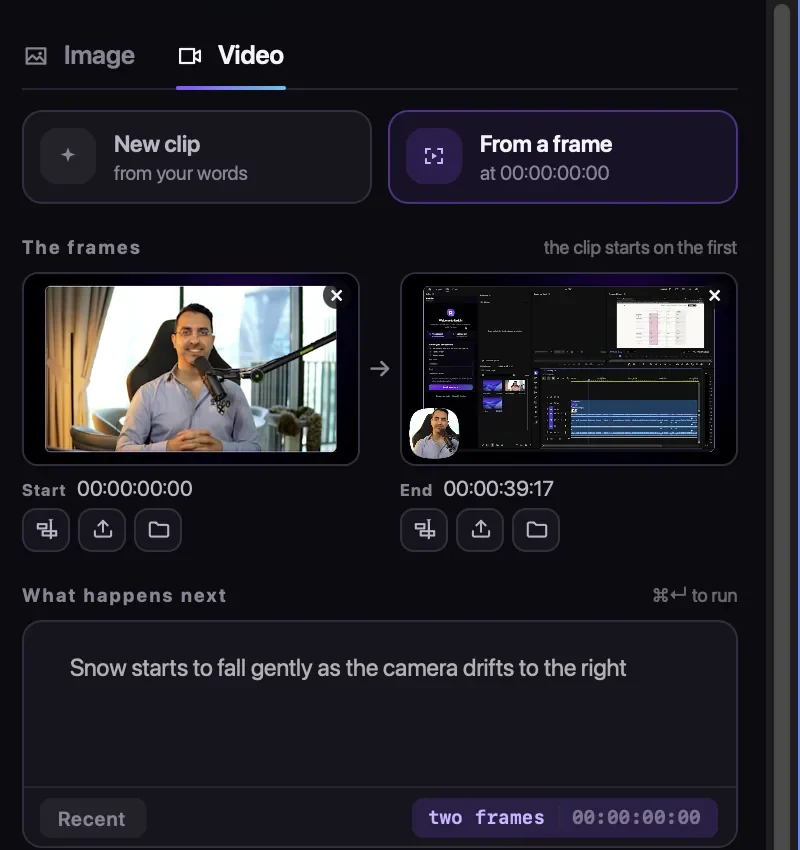
- Image: make a new image from your words, or edit the frame at the playhead; drag on the frame to change only part of it.
- Video: a new clip from your words, or from a frame. The end frame can be a picture, or the playhead moved to where the clip should end. Then say what happens in between.
- Four video models: Gemini Omni 1.1 (4 to 10 seconds, up to 4K, always with sound), Seedance 2.5 (4 to 30 seconds), MiniMax H3 (4 to 15 seconds, stereo sound) and Wan 3 (2 to 30 seconds).
- On your timeline: the clip lands at the playhead and is saved in a bin, and its sound goes on a free audio track, never over your voice. Make up to four versions and swap between them.
Cost: by model and length, shown on the button: about 25 credits for 5 seconds of Wan 3 at 720p, 30 for 8 seconds of Gemini Omni 1.1, and 88 for 5 seconds of Seedance 2.5 at 720p. Creating images and clips needs a plan, from $9.97 a month for 200 credits; the free start covers AI Edit only.
Do you have to label AI B-roll on YouTube?
Only when it looks real. YouTube asks you to disclose content that "seems realistic", and its own examples include AI-generated extra footage of a real location. You don't need a label for clearly unrealistic content, filters, upscaling, or AI help with scripts and captions, and "disclosing AI content alone won't limit a video's audience" (YouTube's rules). YouTube may also add a label by itself when a file carries Content Credentials, which Adobe attaches to Generative Extend results.
Make B-roll from the frame at your playhead
Radbin for Premiere's Create tab makes images and video clips from your own frames with four video models, and lands them on your timeline. Creating needs a plan, from $9.97 a month.
Watch Radbin on YouTube
Real tests and tutorials, inside Photoshop and Premiere. See the whole channel.
 21:44Photoshop 2027 new features vs Radbin
 16:20GPT Image 2.6 in Photoshop: images, vectors and GIFs
 7:37Upscale a low res portrait to 4K in Photoshop
 19:25Relight any photo in Photoshop with AI
 20:03Nano Banana 2.1 vs GPT Image 2 and FLUX 3: ten tests
 14:31Photoshop Relight vs Radbin Lightsmith
 10:24Retouch skin without losing the texture
 9:28Every Radbin tool in 9 minutes
 9:50Fix the focus of any photo after it was taken
 1:43Radbin changes only what you ask